Peripheral Devices Control#
Peripheral Devices Control에 포함된 기능은 카메라와 조명 또는 광학 장치가 서로 직접 통신할 수 있게 해주는 SLP 프로토콜을 기반으로 합니다.
Peripheral Devices Control 섹션에는 다음과 같은 camera features 및 관련 파라미터가 포함됩니다.
- Peripheral Devices Control 항목:
일부 파라미터는 서로 다른 유형의 주변 장치 간에 공유되므로 설정 단계를 포함하여 본 항목에서 설명합니다. - Light Control 항목:
Basler ace 2, boost R, dart M 카메라에서 작동하는 조명 장치 전용 파라미터입니다.
Peripheral Devices Control 기능이 없는 Basler ace U 및 ace L 카메라와 ace 2, boost R, dart M 카메라의 Light Control 기능에 대한 정보는 Light Control (ace U/L) 항목을 참조하십시오. - Optic Control: 렌즈와 같은 광학 장치 전용으로 사용되는 파라미터입니다.
모든 주변 장치에 대해 다음 정보를 사용할 수 있습니다.
- Device Type: 선택한 주변 장치의 유형입니다.
- Model Name: 장치의 제품 이름 및 모델 명칭입니다.
- Firmware Version: 현재 장치에 설치되어 있는 펌웨어 버전입니다.
- Error Status: 활성화된 결함 상태를 포함하여 주변 장치의 현재 오류 상태입니다.
이 필드에 표시되는 값은 현재 선택된 주변 장치에 따라 다릅니다. 다른 주변 장치를 선택하면 표시된 정보가 장치별 값을 보여주도록 그에 맞춰 업데이트됩니다.
나머지 파라미터에 대한 정보는 Using the Peripheral Devices Control Parameters를 참조하십시오.
특정 장치 유형에 고유한 파라미터는 해당 기능 항목(Light Control 또는 Optic Control)에서 제공 및 설명됩니다.
정보
파라미터 이름 변경 및 이전 펌웨어 버전에서의 마이그레이션에 대한 정보는 Compatibility and Parameter Mapping 항목의 표를 참조하십시오. 이 항목에서는 기존 파라미터와 새로운 파라미터 간의 매핑 개요를 제공합니다.
다음 섹션에서는 조명 장치와 광학 장치 모두에 적용되는 기능을 설명합니다.
기능 사용법#
주변 장치 준비#
주변 장치를 준비하려면:
- 아직 수행하지 않은 경우, 필요한 경우 주변 장치(예: 조명, 렌즈)와 제어기를 연결합니다.
- 전원을 켭니다.
-
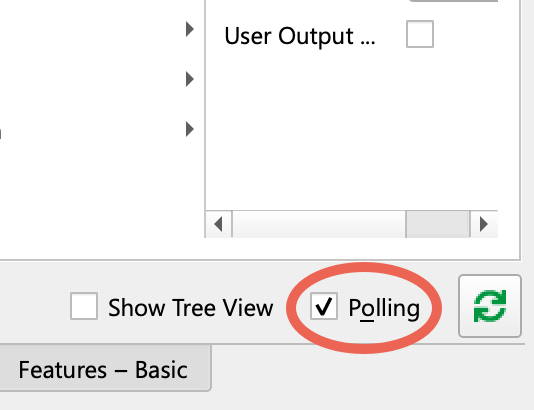
pylon Viewer를 사용할 때 Features 창에서 Polling 옵션이 선택되어 있는지 확인하십시오.
-
카메라가 유휴 상태인지, 즉 이미지를 캡처하고 있지 않은지 확인하십시오.
- 다음 값 중 하나로
BslPeripheralControlMode매개변수:On.
이를 통해 다음을 통해 조명 장치 통신이 활성화됩니다. GPIO line 그리고 Line 3을 다음으로 설정합니다.PeripheralControl. - 다음을 실행합니다.
BslLightControlEnumerateDevices명령입니다.
이것은 다음을 할당합니다. light device ID 새 장치에 연결하고 연결된 조명 장치에 대한 액세스를 활성화합니다. - 경우
BslPeripheralErrorSummary오류를 표시하며, 다음을 설정하여 연결된 모든 장치(조명 및 렌즈)를 확인합니다.BslPeripheralDeviceSelector, 그리고 확인하려는 주변 장치에 적용합니다.
이BslPeripheralDeviceErrorStatus파라미터는 선택한 장치의 상태를 보여줍니다. - 설정하기만 하면 됩니다.
BslPeripheralDeviceTriggerSource및BslPeripheralDeviceTriggerActivation연결된 조명을 스트로빙 용도로 사용하려는 경우에 해당합니다.
대부분의 어플리케이션에서 기본값은FlashWindows대상:BslPeripheralDeviceTriggerSource좋은 선택입니다.
자세한 내용은 Light Control 토픽의 Configuring Trigger Signals and Strobe Duration 섹션을 참조하십시오. 연속광을 사용하는 경우 두 파라미터 모두 설정할 필요가 없습니다.
트리거 신호 및 스트로브 지속 시간 구성#
주변 장치는 BslPeripheralDeviceTriggerSource에서 설정한 신호로 트리거됩니다. 트리거의 효과는 연결된 주변 장치의 유형에 따라 다릅니다. 모든 주변 장치에 전송되는 트리거 신호는 단 하나뿐입니다.
다음 예시는 스트로브 모드 상태의 조명이 트리거 신호에 응답하여 어떻게 변화하는지 보여줍니다.
- 초기 상태에서 조명은 off 상태입니다.
- 트리거 신호에 의해 조명이 on됩니다.
- 조명은 스트로브 지속 시간 동안 켜져 있습니다.
- Strobe 지속 시간이 만료되면 조명이 다시 off됩니다.
Peripheral Devices Control 기능이 있는 카메라에서 트리거 신호와 스트로브 지속 시간을 설정하려면:
- 다음 값 중 하나로
BslPeripheralTriggerSource파라미터를 연결된 조명을 켜는 데 사용할 소스로 설정합니다(예:FlashWindow. - 해당하는 경우 다음 설정으로 지정하세요.
BslPeripheralTriggerActivation매개변수를 다음 값 중 하나로 설정합니다:RisingEdge(기본값):
신호가 들어오면 연결된 모든 조명이 켜집니다. 상승할 때, 즉 신호 상태가 low에서 high로 바뀔 때 Timer가 시작됩니다.FallingEdge:
신호가 들어오면 연결된 모든 조명이 켜집니다. 하강할 때, 즉 신호 상태가 high에서 low로 바뀔 때 Timer가 시작됩니다.AnyEdge: 신호가 들어오면 연결된 모든 조명이 켜집니다. 하강할 때 또는 상승할 때.
오류 확인 및 지우기#
Basler ace 2, boost R, and dart M 카메라는 연결된 주변 장치로부터 다음 오류 데이터를 읽을 수 있습니다.
error status는 오류를 직접 수정하는 데 도움이 될 수 있습니다.
오류를 확인하고 지우려면:
- 여러 장치가 연결되어 있는 경우:
- 다음 항목을 확인하십시오.
BslPeripheralErrorSummary어떤 장치에 문제가 발생했는지 파악하기 위한 파라미터(예:Device2. 둘 이상의 장치에서 문제가 발생하는 경우 값은 다음과 같습니다.MultipleDevices. - 다음 값 중 하나로
BslPeripheralDeviceSelector문제가 발생한 장치의 파라미터입니다.
- 다음 항목을 확인하십시오.
- 다음의 값을 가져옵니다:
BslPeripheralDeviceErrorStatus파라미터를 확인하고 그 의미를 아래의 Error Statuses 표에서 찾아보십시오.
정보
이 값 및 기타 특정 구성 설정에 기반하여 카메라에서 달성할 수 있는 프레임 레이트를 평가하기 위해 BslPeripheralOvertriggerCount 하나 이상의 연결된 주변 장치가 처리할 준비가 되지 않은 상태에서 수신된 트리거 신호의 개수를 확인하는 파라미터입니다.
Error Statuses#
이 BslPeripheralDeviceErrorStatus 파라미터는 다음 값을 가질 수 있습니다.
| Value | 의미 |
|---|---|
| No Error | 오류가 감지되지 않았습니다. |
| Not Connected | 주변 장치가 카메라에 연결되지 않았거나 아직 열거되지 않았습니다. 다음을 실행하십시오. BslPeripheralEnumerateDevices 장치를 열거하는 명령입니다. |
| Communication Error | 주변 장치와 카메라 간의 데이터 전송에 결함이 있는 경우 통신 오류가 발생합니다. 이는 너무 긴 케이블을 사용하거나 라인의 노이즈가 너무 심하기 때문에 발생할 수 있습니다. |
| Connection Lost | 이전에 연결되었던 조명 장치와의 연결이 끊어졌습니다. 이는 예를 들어 케이블이 느슨해졌을 때 발생할 수 있습니다. |
| Hardware Error | 조명 장치에 기술적 결함이 발생했습니다. 하드웨어 오류 종류에 대한 자세한 내용을 확인하려면 BslLightDeviceErrorStatusReadAndClear 명령을 실행하여 오류 코드가.[^a] |
| 주변 장치 오류 | 주변 장치에 내부 오류가 발생했습니다.[^a] |
| 지원되지 않는 장치 버전입니다. | 주변 장치가 현재 카메라와 호환되지 않습니다. 펌웨어 업데이트가 가능한지 확인하려면 지원팀에 문의하십시오. |
장치 정보 확인#
카메라에서 연결된 장치에 대한 세부 정보를 읽을 수 있습니다.
- 다음을 사용하여 사용할 장치를 선택하십시오.
BslPeripheralDeviceSelector예:Device2. - 다음을 사용하여 장치 유형을 확인하십시오.
BslPeripheralDeviceType. 값은 다음과 같습니다.LightControl또는OpticControl. - 연결된 장치의 모델 이름과 펌웨어 버전을 가져오려면 다음을 사용하십시오:
BslPeripheralDeviceModelName및BslPeripheralDeviceFirmwareVersion.
샘플 코드#
정보
이 코드 샘플은 펌웨어에 Peripheral Devices Control 기능을 포함하는 카메라에만 적용됩니다.
ace 2, boost R, dart M Cameras#
// Enable the peripheral devices control mode
camera.BslPeripheralControlMode.SetValue(BslPeripheralControlMode_On);
// Enumerate the peripheral devices
camera.BslPeripheralEnumerateDevices.Execute();
// Check the error summary for any errors that might have occurred
auto summary = camera.BslPeripheralErrorSummary.GetValue();
// Configure the trigger source for all devices.
camera.BslPeripheralTriggerSource.SetValue(BslPeripheralTriggerSource_FlashWindow);
// Trigger on the rising edge of the selected signal.
camera.BslPeripheralTriggerActivation.SetValue(BslPeripheralTriggerActivation_RisingEdge);
// Check for overtrigger from the selected trigger source and reset it
auto count = camera.BslPeripheralOvertriggerCount.GetValue();
camera.BslPeripheralOvertriggerCountReset.Execute();
// Select the peripheral device to configure.
camera.BslPeripheralDeviceSelector.SetValue(BslPeripheralDeviceSelector_Device1);
// Check device type and model name and firmware version
auto deviceType = camera.BslPeripheralDeviceType.GetValue();
auto modelName = camera.BslPeripheralDeviceModelName.GetValue();
auto firmwareVersion = camera.BslPeripheralDeviceFirmwareVersion.GetValue();
// Read error status of the device
auto status = camera.BslPeripheralDeviceErrorStatus.GetValue();
INodeMap& nodemap = camera.GetNodeMap();
// Enable the peripheral devices control mode
CEnumParameter(nodemap, "BslPeripheralControlMode").SetValue("On");
// Enumerate the peripheral devices
CCommandParameter(nodemap, "BslPeripheralEnumerateDevices").Execute();
// Check the error summary for any errors that might have occurred
String_t summary = CEnumParameter(nodemap, "BslPeripheralErrorSummary").GetValue();
// Configure the trigger source for all devices.
CEnumParameter(nodemap, "BslPeripheralTriggerSource").SetValue("FlashWindow");
// Trigger on the rising edge of the selected signal.
CEnumParameter(nodemap, "BslPeripheralTriggerActivation").SetValue("RisingEdge");
// Check for overtrigger from the selected trigger source and reset it
String_t count = CEnumParameter(nodemap, "BslPeripheralOvertriggerCount").GetValue();
CCommandParameter(nodemap, "BslPeripheralOvertriggerCountReset").Execute();
// Select the peripheral device to configure.
CEnumParameter(nodemap, "BslPeripheralDeviceSelector").SetValue("Device1");
// Check device type and model name and firmware version
String_t deviceType = CEnumParameter(nodemap, "BslPeripheralDeviceType").GetValue();
String_t modelName = CEnumParameter(nodemap, "BslPeripheralDeviceModelName").GetValue();
String_t firmwareVersion = CEnumParameter(nodemap, "BslPeripheralDeviceFirmwareVersion").GetValue();
// Read error status of the device
String_t status = CEnumParameter(nodemap, "BslPeripheralDeviceErrorStatus").GetValue();
// Enable the peripheral devices control mode
camera.Parameters[PLCamera.BslPeripheralControlMode].SetValue(PLCamera.BslPeripheralControlMode.On);
// Enumerate the peripheral devices
camera.Parameters[PLCamera.BslPeripheralEnumerateDevices].Execute();
// Check the error summary for any errors that might have occurred
string summary = camera.Parameters[PLCamera.BslPeripheralErrorSummary].GetValue();
// Configure the trigger source for all devices.
camera.Parameters[PLCamera.BslPeripheralTriggerSource].SetValue(PLCamera.BslPeripheralTriggerSource.FlashWindow);
// Trigger on the rising edge of the selected signal.
camera.Parameters[PLCamera.BslPeripheralTriggerActivation].SetValue(PLCamera.BslPeripheralTriggerActivation.RisingEdge);
// Check for overtrigger from the selected trigger source and reset it
string count = camera.Parameters[PLCamera.BslPeripheralOvertriggerCount].GetValue();
camera.Parameters[PLCamera.BslPeripheralOvertriggerCountReset].Execute();
// Select the peripheral device to configure.
camera.Parameters[PLCamera.BslPeripheralDeviceSelector].SetValue(PLCamera.BslPeripheralDeviceSelector.Device1);
// Check device type and model name and firmware version
string deviceType = camera.Parameters[PLCamera.BslPeripheralDeviceType].GetValue();
string modelName = camera.Parameters[PLCamera.BslPeripheralDeviceModelName].GetValue();
string firmwareVersion = camera.Parameters[PLCamera.BslPeripheralDeviceFirmwareVersion].GetValue();
// Read error status of the device
string status = camera.Parameters[PLCamera.BslPeripheralDeviceErrorStatus].GetValue();
/* Macro to check for errors */
#define CHECK(errc) if (GENAPI_E_OK != errc) printErrorAndExit(errc)
GENAPIC_RESULT errRes = GENAPI_E_OK;  /* Return value of pylon methods */
size_t len = 0;
char summary_str[64] = {0};
char count_str[64] = {0};
char deviceType_str[64] = {0};
char modelName_str[64] = {0};
char firmwareVersion_str[64] = {0};
char status_str[64] = {0};
/* Enable the peripheral devices control mode */
errRes = PylonDeviceFeatureFromString(hdev, "BslPeripheralControlMode", "On");
CHECK(errRes);
/* Enumerate the peripheral devices */
errRes = PylonDeviceExecuteCommandFeature(hdev, "BslPeripheralEnumerateDevices");
CHECK(errRes);
/* Check the error summary for any errors that might have occurred */
len = sizeof(summary_str);
errRes = PylonDeviceFeatureToString(hdev, "BslPeripheralErrorSummary", summary_str, &len);
CHECK(errRes);
/* Configure the trigger source for all devices. */
errRes = PylonDeviceFeatureFromString(hdev, "BslPeripheralTriggerSource", "FlashWindow");
CHECK(errRes);
/* Trigger on the rising edge of the selected signal. */
errRes = PylonDeviceFeatureFromString(hdev, "BslPeripheralTriggerActivation", "RisingEdge");
CHECK(errRes);
/* Check for overtrigger from the selected trigger source and reset it */
len = sizeof(count_str);
errRes = PylonDeviceFeatureToString(hdev, "BslPeripheralOvertriggerCount", count_str, &len);
CHECK(errRes);
errRes = PylonDeviceExecuteCommandFeature(hdev, "BslPeripheralOvertriggerCountReset");
CHECK(errRes);
/* Select the peripheral device to configure. */
errRes = PylonDeviceFeatureFromString(hdev, "BslPeripheralDeviceSelector", "Device1");
CHECK(errRes);
/* Check device type and model name and firmware version */
len = sizeof(deviceType_str);
errRes = PylonDeviceFeatureToString(hdev, "BslPeripheralDeviceType", deviceType_str, &len);
CHECK(errRes);
len = sizeof(modelName_str);
errRes = PylonDeviceFeatureToString(hdev, "BslPeripheralDeviceModelName", modelName_str, &len);
CHECK(errRes);
len = sizeof(firmwareVersion_str);
errRes = PylonDeviceFeatureToString(hdev, "BslPeripheralDeviceFirmwareVersion", firmwareVersion_str, &len);
CHECK(errRes);
/* Read error status of the device */
len = sizeof(status_str);
errRes = PylonDeviceFeatureToString(hdev, "BslPeripheralDeviceErrorStatus", status_str, &len);
CHECK(errRes);
# Enable the peripheral devices control mode
camera.BslPeripheralControlMode.Value = "On"
# Enumerate the peripheral devices
camera.BslPeripheralEnumerateDevices.Execute()
# Check the error summary for any errors that might have occurred
summary = camera.BslPeripheralErrorSummary.Value
# Configure the trigger source for all devices.
camera.BslPeripheralTriggerSource.Value = "FlashWindow"
# Trigger on the rising edge of the selected signal.
camera.BslPeripheralTriggerActivation.Value = "RisingEdge"
# Check for overtrigger from the selected trigger source and reset it
count = camera.BslPeripheralOvertriggerCount.Value
camera.BslPeripheralOvertriggerCountReset.Execute()
# Select the peripheral device to configure.
camera.BslPeripheralDeviceSelector.Value = "Device1"
# Check device type and model name and firmware version
deviceType = camera.BslPeripheralDeviceType.Value
modelName = camera.BslPeripheralDeviceModelName.Value
firmwareVersion = camera.BslPeripheralDeviceFirmwareVersion.Value
# Read error status of the device
status = camera.BslPeripheralDeviceErrorStatus.Value
또한 pylon Viewer를 사용하여 파라미터를 손쉽게 설정할 수 있습니다.