Input Filter#
이 기능은 ace Classic/U/L 카메라에서만 사용할 수 있는 Line Debouncer 기능과 유사합니다.
기능 사용#
작동 방식#
다음 카메라 설정 중 하나 이상을 구성하여 입력 필터링을 제어할 수 있습니다.
Input Filter Time#
디지털 입력 신호는 카메라에 도달할 때 완벽한 형태가 아닌 경우가 많습니다. 특히 긴 I/O 케이블을 사용하거나 주변 전력 장비가 있는 경우 주변 전자기장의 노이즈와 간섭을 받을 수 있으며, 스위치 출력으로 인해 누화가 발생할 수도 있습니다.
결과적으로 "low"에서 "high"로(또는 그 반대로) 상태가 변경되는 데 몇 마이크로초가 걸릴 수 있으며, 전환되는 동안 논리 수준이 정의되지 않은 상태로 유지됩니다.
Input filter time을 지정하면 이러한 문제의 대부분을 해결할 수 있습니다.
입력 필터는 입력 신호의 모든 변경 사항과 논리적 상태의 지속 시간을 평가합니다. 이 평가 기간의 길이는 다음 항목에 의해 정의됩니다. BslInputFilterTime 파라미터에 HTML 로그 파일(*.html)의 경로와 이름을 지정할 수 있습니다.
평가 중에 카메라는 시간에 따른 평균값을 계산하고 결과에 임계값 함수를 적용하여 디지털 신호를 재구성합니다. 이를 통해 노이즈, 간섭 등과 필터 시간보다 짧은 신호 펄스가 제거됩니다.
정보
Input filter time을 지정하고 원래 전환 후에도 입력 신호가 안정되지 않으면 전파 지연이 증가합니다.
즉, 아날로그 I/O 신호가 변경된 시점과 카메라의 내부 상태가 변경된 시점 사이의 시간이 더 길어집니다.
Input Hold-Off Time#
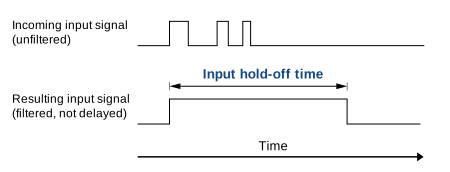
Input hold-off time 설정은 여러 트리거 신호가 잇따라 빠르게 도착할 때 발생하는 오작동(접점 바운스)을 방지하려는 경우에 유용합니다.
Input hold-off time이 설정된 상태에서 입력 트리거 신호가 도착하면 카메라는 해당 신호를 수락하고, hold-off 시간이 경과할 때까지 추가 트리거 신호나 신호 변경을 수락하지 않습니다.
예를 들어, 다음을 설정하는 경우 BslInputHoldOffTime 파라미터를 10으로 설정하고 카메라에 트리거 신호를 인가하면, 카메라는 해당 신호를 수락한 후 10마이크로초 동안 추가 트리거 신호나 신호 변경을 수락하지 않습니다.
정보
input filter time과 달리, input hold-off time을 지정해도 전파 지연은 증가하지 않습니다.
Input Filtering 구성#
- 카메라가 하드웨어 트리거용으로 구성되어 있는지 확인하세요.
- 파라미터를 원하는
LineSelector원하는 입력 라인에 대한 매개변수 (예:Line1. - 다음 항목을 구성하려면 input filter time, 에 대한 값을 입력합니다.
BslInputFilterTime파라미터에 HTML 로그 파일(*.html)의 경로와 이름을 지정할 수 있습니다. - 다음 항목을 구성하려면 input hold-off time, 에 대한 값을 입력합니다.
BslInputHoldOffTime파라미터에 HTML 로그 파일(*.html)의 경로와 이름을 지정할 수 있습니다.
Input Filter 및 Input Hold-Off Time 선택#
- input filter time 또는 input hold-off time을 너무 낮게 설정하면 유효하지 않은 신호 및 신호 상태가 수락됩니다.
- input filter time 또는 input hold-off time을 너무 높게 설정하면 유효한 신호 및 신호 상태가 거부됩니다.
Basler는 다음과 같은 접근 방식을 권장합니다.
- 유효하지 않은 신호의 예상 최대 지속 시간보다 약간 더 긴 input filter time을 선택하십시오.
- 두 유효 신호 간의 예상 최소 간격보다 약간 더 짧은 input hold-off time을 선택하십시오.
짧은 유효 신호가 거부될 위험이 약간 있지만, 대부분의 시나리오에서는 이 방식을 통해 좋은 결과를 얻을 수 있습니다. 애플리케이션을 모니터링하고, 너무 많은 유효 신호가 거부되는 경우 필요에 따라 값을 조정하십시오.
샘플 코드#
INodeMap& nodemap = camera.GetNodeMap();
// Select the desired input line
CEnumParameter(nodemap, "LineSelector").SetValue("Line1");
// Set the input filter time to 10 microseconds
CFloatParameter(nodemap, "BslInputFilterTime").SetValue(10.0);
// Set the input hold-off time to 20 microseconds
CFloatParameter(nodemap, "BslInputHoldOffTime").SetValue(20.0);
// Select the desired input line
camera.Parameters[PLCamera.LineSelector].SetValue(PLCamera.LineSelector.Line1);
// Set the input filter time to 10 microseconds
camera.Parameters[PLCamera.BslInputFilterTime].SetValue(10.0);
// Set the input hold-off time to 20 microseconds
camera.Parameters[PLCamera.BslInputHoldOffTime].SetValue(20.0);
/* Macro to check for errors */
#define CHECK(errc) if (GENAPI_E_OK != errc) printErrorAndExit(errc)
GENAPIC_RESULT errRes = GENAPI_E_OK;  /* Return value of pylon methods */
/* Select the desired input line */
errRes = PylonDeviceFeatureFromString(hdev, "LineSelector", "Line1");
CHECK(errRes);
/* Set the input filter time to 10 microseconds */
errRes = PylonDeviceSetFloatFeature(hdev, "BslInputFilterTime", 10.0);
CHECK(errRes);
/* Set the input hold-off time to 20 microseconds */
errRes = PylonDeviceSetFloatFeature(hdev, "BslInputHoldOffTime", 20.0);
CHECK(errRes);
pylon Viewer를 사용하여 파라미터를 손쉽게 설정할 수도 있습니다.