Sequencer (ace Classic/U/L GigE)#
시퀀스 세트라고 하는 매개변수 설정 세트를 최대 64개까지 정의할 수 있습니다. 카메라는 이미지를 취득하면서 하나의 시퀀스 세트를 차례대로 적용합니다. 이를 통해 최대 프레임 속도를 저하시키지 않고 카메라 매개변수를 신속하게 변경할 수 있습니다.
예를 들어 Sequencer 기능을 사용하여 사전 설정된 Image ROI 또는 Exposure Time 간에 빠르게 전환할 수 있습니다.
기능 사용법#
Sequencer 활성화 또는 비활성화#
활성화된 경우, 시퀀서가 이미지 취득을 제어합니다. 이 상태에서는 구성할 수 없습니다.
비활성화된 경우, 시퀀서를 구성할 수 있지만 이미지 취득을 제어하지는 않습니다.
시퀀서를 활성화하려면:
- 모두 설정 자동 기능 (예: Gain Auto, Exposure Auto) 로
Off. - 다음 값 중 하나로
SequenceEnable매개변수:true.
시퀀서를 비활성화하려면:
- 다음 값 중 하나로
SequenceEnable매개변수:false. - 만약
SequenceConfigurationMode매개변수를 카메라 모델에서 사용할 수 있는 경우 다음으로 설정합니다:On.
Sequence Set의 구성 요소#
시퀀스 세트에는 사용 가능한 경우 다음 매개변수가 포함됩니다:
AcquisitionFrameRateAcquisitionFrameRateEnableBalanceRatioBinningHorizontalBinningVerticalBlackLevelCenterXCenterYChunkEnableChunkModeActiveColorAdjustmentEnableColorAdjustmentHueColorAdjustmentSaturationColorTransformationMatrixFactorColorTransformationValueDecimationVerticalDigitalShiftExposureTimeGainHeightLUTEnableOffsetXOffsetXPixelFormataProcessedRawEnableReverseXReverseYbScalingHorizontalSequenceSetExecutionscStackedZoneImagingEnableStackedZoneImagingZoneEnableStackedZoneImagingZoneHeightStackedZoneImagingZoneOffsetYSubsamplingHorizontalSyncUserOutputTestImageSelectorTimerDelaydTimerDelayTimebasedTimerDurationdTimerDurationTimebasedWidth
-
다음 카메라 모델에서만 사용할 수 있습니다: acA640-300gm/gc, acA800-200gm/gc, acA1300-75gm/gc, acA1920-48gm/gc, acA2500-20gm/gc.
-
다음 카메라 모델에서는 사용할 수 없습니다: acA3088-16gm/gc, acA4024-8gm/gc, acA5472-5gm/gc.
-
auto sequence advance mode가 활성화된 경우에만 포함됩니다.
-
Timer 1에서 사용할 수 있습니다.
기타 모든 카메라 매개변수는 Sequencer 기능을 사용하여 제어할 수 없습니다.
정보
시퀀스 세트를 로드하거나 저장하면 변경하지 않은 항목을 포함하여 위의 모든 매개변수가 항상 로드 또는 저장됩니다. 예를 들어 Exposure Time만 변경하고 다른 모든 매개변수를 기본값으로 유지한 경우, 다른 모든 매개변수의 값도 저장되며 로드 시 덮어쓰여집니다.
Sequence Set 구성#
정보
Sequencer 기능을 사용하려면 먼저 원하는 설정으로 시퀀스 세트를 채워야 합니다. 각 시퀀스 세트에는 0부터 63까지의 고유한 시퀀스 세트 인덱스 번호가 있습니다.
시퀀스 세트를 채우는 방법:
- 다음 값 중 하나로
SequenceSetTotalNumber사용하려는 총 시퀀스 세트 수에 대한 파라미터입니다. - 시퀀스 세트 0에 저장하려는 sequence set parameters를 구성합니다.
- 시퀀스 세트 0을 Save합니다.
- 사용하려는 모든 시퀀스 세트에 대해 2단계와 3단계를 반복합니다. 인덱스 번호 0부터 시작하는 연속된 인덱스 번호 시리즈(예: 시퀀스 세트 0, 1, 2, 3 사용)를 항상 사용해야 합니다.
예: 두 개의 시퀀스 세트가 필요하고 여기에 서로 다른 Image ROI 설정을 지정하려는 경우를 가정해 보겠습니다. 이 경우 방법은 다음과 같습니다:
- 다음 값 중 하나로
SequenceSetTotalNumber파라미터를 2로 설정합니다. - 다음을 조정하여 첫 번째 Image ROI를 생성합니다.
Width,Height,OffsetX및OffsetY파라미터 값입니다. - 시퀀스 세트 0을 Save합니다.
- 다음 항목에 다른 값을 선택하여 두 번째 Image ROI를 생성합니다.
Width,Height,OffsetX및OffsetY파라미터의 상태를 업데이트합니다. - 시퀀스 세트 1을 Save합니다.
이제 configure the sequencer를 통해 두 Image ROI 간에 빠르게 전환할 수 있습니다.
Sequence Set 저장#
시퀀스 세트를 저장하는 방법:
- 다음 값 중 하나로
SequenceSetIndex원하는 시퀀스 세트로 파라미터를 설정합니다. - 다음을 실행합니다.
SequenceSetStore명령입니다.
모든 sequence set parameters의 값이 선택한 시퀀스 세트에 저장됩니다.
Sequence Set 로드#
시퀀스 세트는 Sequencer 동작 중에 자동으로 로드됩니다. 하지만 테스트 목적이나 Sequencer를 구성할 때 시퀀스 세트를 수동으로 로드하는 것이 유용할 수 있습니다.
시퀀스 세트를 수동으로 로드하는 방법:
- 다음 값 중 하나로
SequenceSetIndex원하는 시퀀스 세트로 파라미터를 설정합니다. - 다음을 실행합니다.
SequenceSetLoad명령입니다.
모든 sequence set parameters의 값이 덮어쓰여지고 선택한 시퀀스 세트에 저장된 값으로 교체됩니다.
Sequencer 구성#
시퀀스 세트를 configured한 후에는 Sequencer를 구성해야 합니다.
정보
- Sequencer를 구성하려면 Sequencer가 disabled 상태여야 합니다.
- Sequencer 구성에 변경된 모든 사항은 카메라 전원이 차단될 때 손실됩니다. 또한 Sequencer 설정은 user set에 저장할 수 없습니다. Basler에서는 카메라에 전원이 켜질 때마다 카메라를 재구성하기 위해 pylon API를 사용하여 적절한 프로그램 코드를 작성할 것을 권장합니다.
- SequenceSetIndex chunk를 사용하여 사용된 시퀀스 세트를 추적할 수 있습니다. 활성화되면 각 이미지에는 이미지 취득에 사용된 시퀀스 세트의 인덱스 번호를 포함하는 청크 데이터가 포함됩니다.
Sequencer는 "advance modes"라고 하는 세 가지 모드로 작동할 수 있습니다:
모든 모드에서 시퀀스 세트는 시퀀스 세트 인덱스 번호 0부터 시작하여 항상 오름차순으로 진행됩니다.
Auto Sequence Advance Mode#
이 모드는 지속적으로 반복되는 고정된 시퀀스를 구성하려는 경우에 유용합니다.
다음 설정을 통해 이 모드를 활성화할 수 있습니다. SequenceAdvanceMode 매개변수: Auto.
이 모드에서는 Frame Start trigger 신호가 수신됨에 따라 한 시퀀스 세트에서 다음 시퀀스 세트로의 전환이 자동으로 이루어집니다.
이 SequenceSetTotalNumber 파라미터는 사용할 시퀀스 세트의 총 개수를 지정합니다. 인덱스 번호가 가장 높은 시퀀스 세트가 사용된 후, 사이클은 다시 0에서 시작됩니다.
예시: 다음과 같은 시퀀스 사이클을 구성하려고 한다고 가정해 보겠습니다.

위의 시퀀스 사이클을 구성하려면:
- 다음 값 중 하나로
SequenceAdvanceMode매개변수:Auto. - 다음 값 중 하나로
SequenceSetTotalNumber파라미터를 5로 설정합니다.
시퀀스 세트 여러 번 사용하기
선택적으로 각 시퀀스 세트를 연속으로 여러 번 사용할 수 있습니다.
각 시퀀스 세트를 사용할 횟수를 지정하려면:
- 원하는 시퀀스 세트를 Load합니다.
- 이 시퀀스 세트의
SequenceSetExecutions파라미터를 구성합니다. 기본적으로 이 파라미터는 모든 세트에 대해 1로 설정되어 있어, 각 시퀀스 세트가 사이클당 한 번씩 사용됨을 의미합니다. - 시퀀스 세트를 Save합니다.
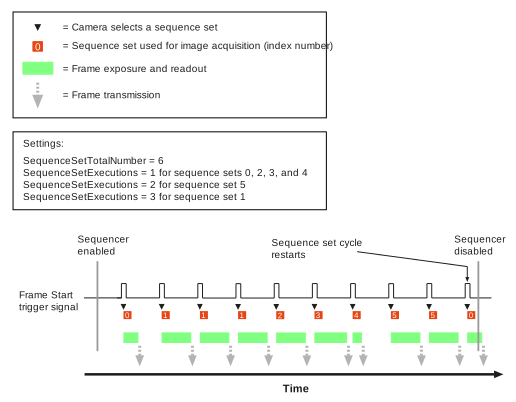
예시: 다음과 같은 시퀀스 사이클을 구성하려고 한다고 가정해 보겠습니다.

위의 시퀀스 사이클을 구성하려면:
- 다음 값 중 하나로
SequenceAdvanceMode매개변수:Auto. - 다음 값 중 하나로
SequenceSetTotalNumber파라미터를 6으로 설정합니다. -
이 시퀀스 세트의
SequenceSetExecutions각 시퀀스 세트의 파라미터:- 시퀀스 세트 0, 2, 3, 4는 사이클당 한 번만 사용됩니다. 따라서 이 세트들은 건너뛰고
SequenceSetExecutions파라미터를 기본값인 1로 유지할 수 있습니다. - 시퀀스 세트 1은 연속으로 세 번 사용됩니다. 불러오기 Sequence set 1에서, 다음 파라미터를 설정합니다:
SequenceSetExecutionsparameter를 3으로 설정하고, save sequence set 1입니다. - Sequence set 5는 연속으로 두 번 사용됩니다. 불러오기 sequence set 5에서, 다음 파라미터를 설정합니다:
SequenceSetExecutionsparameter를 2로 설정하고, save sequence set 5입니다.
- 시퀀스 세트 0, 2, 3, 4는 사이클당 한 번만 사용됩니다. 따라서 이 세트들은 건너뛰고
Controlled Sequence Advance Mode#
이 모드는 Line 1 또는 소프트웨어 명령을 통해 제어할 수 있는 동적(dynamic) Sequencer를 구성하려는 경우에 유용합니다.
정보
- 실시간 애플리케이션의 경우, Basler는 소프트웨어 명령을 통해 Sequencer를 제어하지 않는 것을 적극 권장합니다. 소프트웨어 명령을 전송한 시점과 해당 명령이 적용되는 시점 사이의 지연 시간은 특정 설치 환경 및 네트워크의 현재 부하에 따라 달라집니다. 따라서 소프트웨어 명령을 전송한 후 명령이 적용될 때까지 몇 장의 이미지 획득이 발생할지 예측하는 것은 불가능합니다.
- Line 1을 사용하여 Sequencer를 제어하는 경우, 라인 상태 설정과 Frame Start Trigger 신호 상승 사이에 1마이크로초가 소요된다는 점을 염두에 두어야 합니다. 또한 Frame Start Trigger 신호가 상승한 후에도 최소 1마이크로초 동안 라인 상태를 유지해야 합니다. 타이밍을 최적화하려면 Monitor the Frame Trigger Wait signal을 참조하세요.
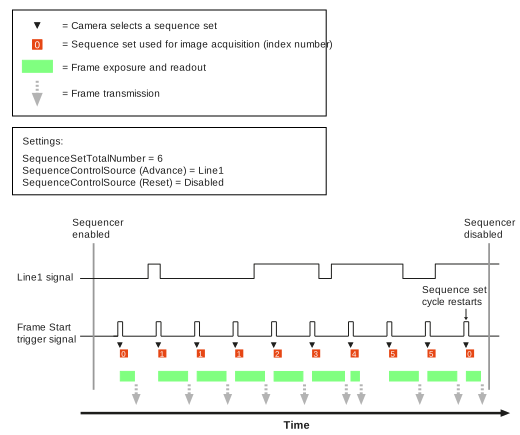
다음 설정을 통해 이 모드를 활성화할 수 있습니다. SequenceAdvanceMode 매개변수: Controlled.
다른 모드와 마찬가지로, 진행은 항상 Sequencer set 인덱스 번호 0부터 오름차순으로 진행됩니다.
그러나 다음 항목을 제어할 수 있습니다:
- Sequence set advance: Sequencer가 다음 Sequence set로 진행되기를 원하는 시점은 언제인가요?
- Sequence set restart: Sequence 주기가 Sequence set 0부터 다시 시작되기를 원하는 시점은 언제인가요?
이 SequenceSetTotalNumber parameter는 사용할 Sequence set의 총 개수를 지정합니다. 인덱스 번호가 가장 높은 Sequence set가 사용된 후, 주기는 0부터 다시 시작됩니다.
Sequence Set Advance 구성#
Sequence set advance를 구성하려면:
- 다음 값 중 하나로
SequenceControlSelector매개변수:Advance. - 다음 값 중 하나로
SequenceControlSourceparameter to one of the following options:Line1: Sequence set advance는 Line 1을 통해 제어됩니다. Frame start trigger 신호가 수신되는 동안 Line 1이 Low(0)인 경우, frame start trigger 신호가 수신되면 Sequencer는 진행되지 않으며 이미지 획득을 위해 현재 Sequence set가 다시 사용됩니다. Frame Start Trigger 신호가 수신되는 동안 Line 1이 High(1)인 경우, Sequencer가 진행되며 이미지 획득을 위해 주기의 다음 Sequence set가 사용됩니다.Disabled: Sequence set advance는 다음을 사용하여 제어됩니다.SequenceAsyncAdvancesoftware command. 이 명령이 수신되면 Sequencer는 이미지를 획득하지 않고 진행됩니다. 다음 Frame Start Trigger 신호가 수신되면, 다음 항목이 나타내는 Sequence set는 다음과 같습니다.SequenceCurrentSetparameter value is used for image acquisition.AlwaysActive: Sequencer는 마치Line1was selected and line 1 was always high (1). As a result, the sequencer advances every time a frame start trigger signal is received. This way of operating the sequencer is similar to operating it in auto sequence advance mode when each sequence set is used only once per cycle. The only difference is that sequence set 1 is used as the first sequence set instead of sequence set 0.
Configuring Sequence Set Restart#
To configure sequence set restart:
- 다음 값 중 하나로
SequenceControlSelector매개변수:Restart. - 다음 값 중 하나로
SequenceControlSourceparameter to one of the following options:Line1: Sequence set restart will be controlled via line 1. If line 1 is low (0) while a frame start trigger signal is received, the next sequence set is used. If line 1 is high (1) while a Frame Start trigger signal is received, the sequence cycle is restarted and sequence set 0 is used.Disabled: Sequence set restart will be controlled using theSequenceAsyncRestartsoftware command. When this command is received, the sequence cycle is restarted without acquiring an image. When the next Frame Start Trigger signal is received, sequence set 0 is used.
Free Selection Advance Mode#
This mode is useful if you want to quickly change between freely selectable sequence sets without having to observe any particular order. You use the input lines of your camera to determine the sequence.
정보
Bear in mind that it takes one microsecond between setting the status of the line and the rise of the Frame Start trigger signal. You also have to maintain the status of the line for at least one microsecond after the Frame Start trigger signal has risen. Monitor the Frame Trigger Wait signal to optimize the timing.
How to configure free selection advance mode depends on how many input lines are available on your camera:
Cameras with One Input Line#
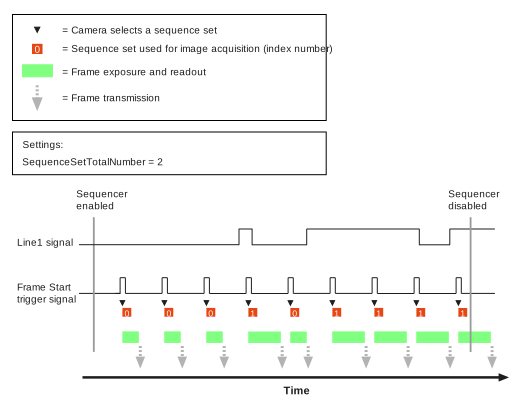
Sequence sets are chosen according to the status of input line 1:
- If line 1 is low (0) while a frame start trigger signal is received, sequence set 0 is used for image acquisition.
- If line 1 is high (1) while a Frame Start trigger signal is received, sequence set 1 is used for image acquisition.
Only sequence sets 0 and 1 are available.
To enable free selection advance mode:
- 다음 값 중 하나로
SequenceAdvanceMode매개변수:FreeSelection. - 다음 값 중 하나로
SequenceSetTotalNumber파라미터를 2로 설정합니다.
이 SequenceAddressBitSelector 및 SequenceAddressBitSource parameters also control the operation of the free selection advance mode. However, these parameters are preset and can't be changed.
Cameras with Two Input Lines#
Sequence sets are chosen according to the status of line 1 (opto-coupled input line) and line 3 (GPIO line, must be configured as input), resulting in four possible combinations. This allows you to choose between four sequence sets. Consequently, only sequence sets 0, 1, 2, and 3 are available.
In order to configure the free selection advance mode, you must assign a "sequence set address bit" to each line. The combinations of these address bits determine the sequence set index number. The following table shows the possible combinations and their respective outcomes.
| Address Bit 1 | Address Bit 0 | Sequence Set That Will Be Selected |
|---|---|---|
| 0 | 0 | Sequence set 0 |
| 0 | 1 | Sequence set 1 |
| 1 | 0 | Sequence set 2 |
| 1 | 1 | Sequence set 3 |
예를 들어, Line 1을 Bit 1에 할당하고 Line 3을 Bit 0에 할당할 수 있습니다. 결과적으로 다음과 같은 예시 구성이 됩니다.
- Frame Start Trigger 신호가 수신될 때 Line 1이 Low(0)이고 Line 3이 Low(0)인 경우, 이미지 획득에 Sequence set 0이 사용됩니다.
- Frame Start Trigger 신호가 수신될 때 Line 1이 Low(0)이고 Line 3이 High(1)인 경우, 이미지 획득에 Sequence set 1이 사용됩니다.
- Frame Start Trigger 신호가 수신될 때 Line 1이 High(1)이고 Line 3이 Low(0)인 경우, 이미지 획득에 Sequence set 2가 사용됩니다.
- Frame Start Trigger 신호가 수신될 때 Line 1이 High(1)이고 Line 3이 High(1)인 경우, 이미지 획득에 Sequence set 3이 사용됩니다.
Bit를 구성하고 Free Selection Advance 모드를 활성화하려면 다음을 수행합니다.
- 다음 값 중 하나로
SequenceAdvanceMode매개변수:FreeSelection. - 다음 값 중 하나로
SequenceSetTotalNumber파라미터를 4로 설정합니다. - 다음 값 중 하나로
SequenceAddressBitSelector매개변수:Bit0. - 다음 값 중 하나로
SequenceAddressBitSource파라미터를 Bit 0에 할당하려는 라인으로 설정합니다(예:Line3. - 다음 값 중 하나로
SequenceAddressBitSelector매개변수:Bit1. - 다음 값 중 하나로
SequenceAddressBitSource파라미터를 Bit 1에 할당하려는 라인으로 설정합니다(예:Line1.
정보
Free Selection Advance 모드에서는 하나의 입력 라인만 사용할 수도 있습니다. 이렇게 하려면 SequenceSetTotalNumber 파라미터를 2로 설정합니다. 이제 Bit 0만 사용하여 Sequence set을 선택합니다. Free Selection Advance 모드는 "Cameras with One Input Line"에 설명된 대로 작동합니다.
타이밍 다이어그램#
예시: Auto Sequence Advance Mode#
예시: Controlled Sequence Advance Mode (Line 1을 통해 제어됨)#
예시: Free Selection Advance Mode#
샘플 코드#
// ** Configuring sequence sets **
// Disable the sequencer during configuration
camera.SequenceEnable.SetValue(false);
// Enable configuration mode (available on selected cameras only)
camera.SequenceConfigurationMode.SetValue(SequenceConfigurationMode_On);
// Set the total number of sequence sets to 2
camera.SequenceSetTotalNumber.SetValue(2);
// Configure the parameters that you want to store in the first sequence set
camera.Width.SetValue(500);
camera.Height.SetValue(300);
// Select sequence set 0 and save the parameter values
camera.SequenceSetIndex.SetValue(0);
camera.SequenceSetStore.Execute();
// Configure the parameters that you want to store in the second sequence set
camera.Width.SetValue(800);
camera.Height.SetValue(600);
// Select sequence set 1 and save the parameter values
camera.SequenceSetIndex.SetValue(1);
camera.SequenceSetStore.Execute();
// ** Configuring the sequencer for auto sequence advance mode
// Assuming you want to configure the following sequence cycle:
// 0 - 0 - 1 - 1 - 1 (- 0 - 0 - ...) **
// Disable the sequencer during configuration
camera.SequenceEnable.SetValue(false);
camera.SequenceAdvanceMode.SetValue(SequenceAdvanceMode_Auto);
// Set the total number of sequence sets to 2
camera.SequenceSetTotalNumber.SetValue(2);
// Load sequence set 0 and specify that this set is to be used
// 2 times in a row
camera.SequenceSetIndex.SetValue(0);
camera.SequenceSetLoad.Execute();
camera.SequenceSetExecutions.SetValue(2);
camera.SequenceSetStore.Execute();
// Load sequence set 1 and specify that this set is to be used
// 3 times in a row
camera.SequenceSetIndex.SetValue(1);
camera.SequenceSetLoad.Execute();
camera.SequenceSetExecutions.SetValue(3);
camera.SequenceSetStore.Execute();
// Enable the sequencer
camera.SequenceEnable.SetValue(true);
// ** Configuring the sequencer for controlled sequence advance mode **
// Disable the sequencer during configuration
camera.SequenceEnable.SetValue(false);
camera.SequenceAdvanceMode.SetValue(SequenceAdvanceMode_Controlled);
// Set the total number of sequence sets to 2
camera.SequenceSetTotalNumber.SetValue(2);
// Specify that sequence set advance is controlled via line 1
camera.SequenceControlSelector.SetValue(SequenceControlSelector_Advance);
camera.SequenceControlSource.SetValue(SequenceControlSource_Line1);
// Specify that sequence set restart is controlled
// via software command
camera.SequenceControlSelector.SetValue(SequenceControlSelector_Restart);
camera.SequenceControlSource.SetValue(SequenceControlSource_Disabled);
// Enable the sequencer
camera.SequenceEnable.SetValue(true);
// Restart the sequencer via software command (for testing purposes)
camera.SequenceAsyncRestart.Execute();
// ** Configuring the sequencer for free selection advance mode
// on cameras with ONE input line **
// Disable the sequencer during configuration
camera.SequenceEnable.SetValue(false);
camera.SequenceAdvanceMode.SetValue(SequenceAdvanceMode_FreeSelection);
// Set the total number of sequence sets to 2
camera.SequenceSetTotalNumber.SetValue(2);
// Enable the sequencer
camera.SequenceEnable.SetValue(true);
// ** Configuring the sequencer for free selection advance mode
// on cameras with TWO input lines (1x opto-coupled, 1x GPIO set for input) **
// Disable the sequencer during configuration
camera.SequenceEnable.SetValue(false);
camera.SequenceAdvanceMode.SetValue(SequenceAdvanceMode_FreeSelection);
// Set the total number of sequence sets to 2
camera.SequenceSetTotalNumber.SetValue(4);
// Assign sequence address bit 0 to line 3
camera.SequenceAddressBitSelector.SetValue(SequenceAddressBitSelector_Bit0);
camera.SequenceAddressBitSource.SetValue(SequenceAddressBitSource_Line3);
// Assign sequence address bit 1 to line 1
camera.SequenceAddressBitSelector.SetValue(SequenceAddressBitSelector_Bit1);
camera.SequenceAddressBitSource.SetValue(SequenceAddressBitSource_Line1);
// Enable the sequencer
camera.SequenceEnable.SetValue(true);
INodeMap& nodemap = camera.GetNodeMap();
// ** Configuring sequence sets **
// Disable the sequencer during configuration
CBooleanParameter(nodemap, "SequenceEnable").SetValue(false);
// Enable configuration mode (available on selected cameras only)
CEnumParameter(nodemap, "SequenceConfigurationMode").SetValue("On");
// Set the total number of sequence sets to 2
CIntegerParameter(nodemap, "SequenceSetTotalNumber").SetValue(2);
// Configure the parameters that you want to store in the first sequence set
CIntegerParameter(nodemap, "Width").SetValue(500);
CIntegerParameter(nodemap, "Height").SetValue(300);
// Select sequence set 0 and save the parameter values
CIntegerParameter(nodemap, "SequenceSetIndex").SetValue(0);
CCommandParameter(nodemap, "SequenceSetStore").Execute();
// Configure the parameters that you want to store in the second sequence set
CIntegerParameter(nodemap, "Width").SetValue(800);
CIntegerParameter(nodemap, "Height").SetValue(600);
// Select sequence set 1 and save the parameter values
CIntegerParameter(nodemap, "SequenceSetIndex").SetValue(1);
CCommandParameter(nodemap, "SequenceSetStore").Execute();
// ** Configuring the sequencer for auto sequence advance mode
// Assuming you want to configure the following sequence cycle:
// 0 - 0 - 1 - 1 - 1 (- 0 - 0 - ...) **
// Disable the sequencer during configuration
CBooleanParameter(nodemap, "SequenceEnable").SetValue(false);
CEnumParameter(nodemap, "SequenceAdvanceMode").SetValue("Auto");
// Set the total number of sequence sets to 2
CIntegerParameter(nodemap, "SequenceSetTotalNumber").SetValue(2);
// Load sequence set 0 and specify that this set is to be used
// 2 times in a row
CIntegerParameter(nodemap, "SequenceSetIndex").SetValue(0);
CCommandParameter(nodemap, "SequenceSetLoad").Execute();
CIntegerParameter(nodemap, "SequenceSetExecutions").SetValue(2);
CCommandParameter(nodemap, "SequenceSetStore").Execute();
// Load sequence set 1 and specify that this set is to be used
// 3 times in a row
CIntegerParameter(nodemap, "SequenceSetIndex").SetValue(1);
CCommandParameter(nodemap, "SequenceSetLoad").Execute();
CIntegerParameter(nodemap, "SequenceSetExecutions").SetValue(3);
CCommandParameter(nodemap, "SequenceSetStore").Execute();
// Enable the sequencer
CBooleanParameter(nodemap, "SequenceEnable").SetValue(true);
// ** Configuring the sequencer for controlled sequence advance mode **
// Disable the sequencer during configuration
CBooleanParameter(nodemap, "SequenceEnable").SetValue(false);
CEnumParameter(nodemap, "SequenceAdvanceMode").SetValue("Controlled");
// Set the total number of sequence sets to 2
CIntegerParameter(nodemap, "SequenceSetTotalNumber").SetValue(2);
// Specify that sequence set advance is controlled via line 1
CEnumParameter(nodemap, "SequenceControlSelector").SetValue("Advance");
CEnumParameter(nodemap, "SequenceControlSource").SetValue("Line1");
// Specify that sequence set restart is controlled
// via software command
CEnumParameter(nodemap, "SequenceControlSelector").SetValue("Restart");
CEnumParameter(nodemap, "SequenceControlSource").SetValue("Disabled");
// Enable the sequencer
CBooleanParameter(nodemap, "SequenceEnable").SetValue(true);
// Restart the sequencer via software command (for testing purposes)
CCommandParameter(nodemap, "SequenceAsyncRestart").Execute();
// ** Configuring the sequencer for free selection advance mode
// on cameras with ONE input line **
// Disable the sequencer during configuration
CBooleanParameter(nodemap, "SequenceEnable").SetValue(false);
CEnumParameter(nodemap, "SequenceAdvanceMode").SetValue("FreeSelection");
// Set the total number of sequence sets to 2
CIntegerParameter(nodemap, "SequenceSetTotalNumber").SetValue(2);
// Enable the sequencer
CBooleanParameter(nodemap, "SequenceEnable").SetValue(true);
// ** Configuring the sequencer for free selection advance mode
// on cameras with TWO input lines (1x opto-coupled, 1x GPIO set for input) **
// Disable the sequencer during configuration
CBooleanParameter(nodemap, "SequenceEnable").SetValue(false);
CEnumParameter(nodemap, "SequenceAdvanceMode").SetValue("FreeSelection");
// Set the total number of sequence sets to 2
CIntegerParameter(nodemap, "SequenceSetTotalNumber").SetValue(4);
// Assign sequence address bit 0 to line 3
CEnumParameter(nodemap, "SequenceAddressBitSelector").SetValue("Bit0");
CEnumParameter(nodemap, "SequenceAddressBitSource").SetValue("Line3");
// Assign sequence address bit 1 to line 1
CEnumParameter(nodemap, "SequenceAddressBitSelector").SetValue("Bit1");
CEnumParameter(nodemap, "SequenceAddressBitSource").SetValue("Line1");
// Enable the sequencer
CBooleanParameter(nodemap, "SequenceEnable").SetValue(true);
// ** Configuring sequence sets **
// Disable the sequencer during configuration
camera.Parameters[PLCamera.SequenceEnable].SetValue(false);
// Enable configuration mode (available on selected cameras only)
camera.Parameters[PLCamera.SequenceConfigurationMode].SetValue(PLCamera.SequenceConfigurationMode.On);
// Set the total number of sequence sets to 2
camera.Parameters[PLCamera.SequenceSetTotalNumber].SetValue(2);
// Configure the parameters that you want to store in the first sequence set
camera.Parameters[PLCamera.Width].SetValue(500);
camera.Parameters[PLCamera.Height].SetValue(300);
// Select sequence set 0 and save the parameter values
camera.Parameters[PLCamera.SequenceSetIndex].SetValue(0);
camera.Parameters[PLCamera.SequenceSetStore].Execute();
// Configure the parameters that you want to store in the second sequence set
camera.Parameters[PLCamera.Width].SetValue(800);
camera.Parameters[PLCamera.Height].SetValue(600);
// Select sequence set 1 and save the parameter values
camera.Parameters[PLCamera.SequenceSetIndex].SetValue(1);
camera.Parameters[PLCamera.SequenceSetStore].Execute();
// ** Configuring the sequencer for auto sequence advance mode
// Assuming you want to configure the following sequence cycle:
// 0 - 0 - 1 - 1 - 1 (- 0 - 0 - ...) **
// Disable the sequencer during configuration
camera.Parameters[PLCamera.SequenceEnable].SetValue(false);
camera.Parameters[PLCamera.SequenceAdvanceMode].SetValue(PLCamera.SequenceAdvanceMode.Auto);
// Set the total number of sequence sets to 2
camera.Parameters[PLCamera.SequenceSetTotalNumber].SetValue(2);
// Load sequence set 0 and specify that this set is to be used
// 2 times in a row
camera.Parameters[PLCamera.SequenceSetIndex].SetValue(0);
camera.Parameters[PLCamera.SequenceSetLoad].Execute();
camera.Parameters[PLCamera.SequenceSetExecutions].SetValue(2);
camera.Parameters[PLCamera.SequenceSetStore].Execute();
// Load sequence set 1 and specify that this set is to be used
// 3 times in a row
camera.Parameters[PLCamera.SequenceSetIndex].SetValue(1);
camera.Parameters[PLCamera.SequenceSetLoad].Execute();
camera.Parameters[PLCamera.SequenceSetExecutions].SetValue(3);
camera.Parameters[PLCamera.SequenceSetStore].Execute();
// Enable the sequencer
camera.Parameters[PLCamera.SequenceEnable].SetValue(true);
// ** Configuring the sequencer for controlled sequence advance mode **
// Disable the sequencer during configuration
camera.Parameters[PLCamera.SequenceEnable].SetValue(false);
camera.Parameters[PLCamera.SequenceAdvanceMode].SetValue(PLCamera.SequenceAdvanceMode.Controlled);
// Set the total number of sequence sets to 2
camera.Parameters[PLCamera.SequenceSetTotalNumber].SetValue(2);
// Specify that sequence set advance is controlled via line 1
camera.Parameters[PLCamera.SequenceControlSelector].SetValue(PLCamera.SequenceControlSelector.Advance);
camera.Parameters[PLCamera.SequenceControlSource].SetValue(PLCamera.SequenceControlSource.Line1);
// Specify that sequence set restart is controlled
// via software command
camera.Parameters[PLCamera.SequenceControlSelector].SetValue(PLCamera.SequenceControlSelector.Restart);
camera.Parameters[PLCamera.SequenceControlSource].SetValue(PLCamera.SequenceControlSource.Disabled);
// Enable the sequencer
camera.Parameters[PLCamera.SequenceEnable].SetValue(true);
// Restart the sequencer via software command (for testing purposes)
camera.Parameters[PLCamera.SequenceAsyncRestart].Execute();
// ** Configuring the sequencer for free selection advance mode
// on cameras with ONE input line **
// Disable the sequencer during configuration
camera.Parameters[PLCamera.SequenceEnable].SetValue(false);
camera.Parameters[PLCamera.SequenceAdvanceMode].SetValue(PLCamera.SequenceAdvanceMode.FreeSelection);
// Set the total number of sequence sets to 2
camera.Parameters[PLCamera.SequenceSetTotalNumber].SetValue(2);
// Enable the sequencer
camera.Parameters[PLCamera.SequenceEnable].SetValue(true);
// ** Configuring the sequencer for free selection advance mode
// on cameras with TWO input lines (1x opto-coupled, 1x GPIO set for input) **
// Disable the sequencer during configuration
camera.Parameters[PLCamera.SequenceEnable].SetValue(false);
camera.Parameters[PLCamera.SequenceAdvanceMode].SetValue(PLCamera.SequenceAdvanceMode.FreeSelection);
// Set the total number of sequence sets to 2
camera.Parameters[PLCamera.SequenceSetTotalNumber].SetValue(4);
// Assign sequence address bit 0 to line 3
camera.Parameters[PLCamera.SequenceAddressBitSelector].SetValue(PLCamera.SequenceAddressBitSelector.Bit0);
camera.Parameters[PLCamera.SequenceAddressBitSource].SetValue(PLCamera.SequenceAddressBitSource.Line3);
// Assign sequence address bit 1 to line 1
camera.Parameters[PLCamera.SequenceAddressBitSelector].SetValue(PLCamera.SequenceAddressBitSelector.Bit1);
camera.Parameters[PLCamera.SequenceAddressBitSource].SetValue(PLCamera.SequenceAddressBitSource.Line1);
// Enable the sequencer
camera.Parameters[PLCamera.SequenceEnable].SetValue(true);
/* Macro to check for errors */
#define CHECK(errc) if (GENAPI_E_OK != errc) printErrorAndExit(errc)
GENAPIC_RESULT errRes = GENAPI_E_OK;  /* Return value of pylon methods */
/* ** Configuring sequence sets ** */
/* Disable the sequencer during configuration */
errRes = PylonDeviceSetBooleanFeature(hdev, "SequenceEnable", 0);
CHECK(errRes);
/* Enable configuration mode (available on selected cameras only) */
errRes = PylonDeviceFeatureFromString(hdev, "SequenceConfigurationMode", "On");
CHECK(errRes);
/* Set the total number of sequence sets to 2 */
errRes = PylonDeviceSetIntegerFeature(hdev, "SequenceSetTotalNumber", 2);
CHECK(errRes);
/* Configure the parameters that you want to store in the first sequence set */
errRes = PylonDeviceSetIntegerFeature(hdev, "Width", 500);
CHECK(errRes);
errRes = PylonDeviceSetIntegerFeature(hdev, "Height", 300);
CHECK(errRes);
/* Select sequence set 0 and save the parameter values */
errRes = PylonDeviceSetIntegerFeature(hdev, "SequenceSetIndex", 0);
CHECK(errRes);
errRes = PylonDeviceExecuteCommandFeature(hdev, "SequenceSetStore");
CHECK(errRes);
/* Configure the parameters that you want to store in the second sequence set */
errRes = PylonDeviceSetIntegerFeature(hdev, "Width", 800);
CHECK(errRes);
errRes = PylonDeviceSetIntegerFeature(hdev, "Height", 600);
CHECK(errRes);
/* Select sequence set 1 and save the parameter values */
errRes = PylonDeviceSetIntegerFeature(hdev, "SequenceSetIndex", 1);
CHECK(errRes);
errRes = PylonDeviceExecuteCommandFeature(hdev, "SequenceSetStore");
CHECK(errRes);
/* ** Configuring the sequencer for auto sequence advance mode */
/* Assuming you want to configure the following sequence cycle: */
/* 0 - 0 - 1 - 1 - 1 (- 0 - 0 - ...) ** */
/* Disable the sequencer during configuration */
errRes = PylonDeviceSetBooleanFeature(hdev, "SequenceEnable", 0);
CHECK(errRes);
errRes = PylonDeviceFeatureFromString(hdev, "SequenceAdvanceMode", "Auto");
CHECK(errRes);
/* Set the total number of sequence sets to 2 */
errRes = PylonDeviceSetIntegerFeature(hdev, "SequenceSetTotalNumber", 2);
CHECK(errRes);
/* Load sequence set 0 and specify that this set is to be used */
/* 2 times in a row */
errRes = PylonDeviceSetIntegerFeature(hdev, "SequenceSetIndex", 0);
CHECK(errRes);
errRes = PylonDeviceExecuteCommandFeature(hdev, "SequenceSetLoad");
CHECK(errRes);
errRes = PylonDeviceSetIntegerFeature(hdev, "SequenceSetExecutions", 2);
CHECK(errRes);
errRes = PylonDeviceExecuteCommandFeature(hdev, "SequenceSetStore");
CHECK(errRes);
/* Load sequence set 1 and specify that this set is to be used */
/* 3 times in a row */
errRes = PylonDeviceSetIntegerFeature(hdev, "SequenceSetIndex", 1);
CHECK(errRes);
errRes = PylonDeviceExecuteCommandFeature(hdev, "SequenceSetLoad");
CHECK(errRes);
errRes = PylonDeviceSetIntegerFeature(hdev, "SequenceSetExecutions", 3);
CHECK(errRes);
errRes = PylonDeviceExecuteCommandFeature(hdev, "SequenceSetStore");
CHECK(errRes);
/* Enable the sequencer */
errRes = PylonDeviceSetBooleanFeature(hdev, "SequenceEnable", 1);
CHECK(errRes);
/* ** Configuring the sequencer for controlled sequence advance mode ** */
/* Disable the sequencer during configuration */
errRes = PylonDeviceSetBooleanFeature(hdev, "SequenceEnable", 0);
CHECK(errRes);
errRes = PylonDeviceFeatureFromString(hdev, "SequenceAdvanceMode", "Controlled");
CHECK(errRes);
/* Set the total number of sequence sets to 2 */
errRes = PylonDeviceSetIntegerFeature(hdev, "SequenceSetTotalNumber", 2);
CHECK(errRes);
/* Specify that sequence set advance is controlled via line 1 */
errRes = PylonDeviceFeatureFromString(hdev, "SequenceControlSelector", "Advance");
CHECK(errRes);
errRes = PylonDeviceFeatureFromString(hdev, "SequenceControlSource", "Line1");
CHECK(errRes);
/* Specify that sequence set restart is controlled */
/* via software command */
errRes = PylonDeviceFeatureFromString(hdev, "SequenceControlSelector", "Restart");
CHECK(errRes);
errRes = PylonDeviceFeatureFromString(hdev, "SequenceControlSource", "Disabled");
CHECK(errRes);
/* Enable the sequencer */
errRes = PylonDeviceSetBooleanFeature(hdev, "SequenceEnable", 1);
CHECK(errRes);
/* Restart the sequencer via software command (for testing purposes) */
errRes = PylonDeviceExecuteCommandFeature(hdev, "SequenceAsyncRestart");
CHECK(errRes);
/* ** Configuring the sequencer for free selection advance mode */
/* on cameras with ONE input line ** */
/* Disable the sequencer during configuration */
errRes = PylonDeviceSetBooleanFeature(hdev, "SequenceEnable", 0);
CHECK(errRes);
errRes = PylonDeviceFeatureFromString(hdev, "SequenceAdvanceMode", "FreeSelection");
CHECK(errRes);
/* Set the total number of sequence sets to 2 */
errRes = PylonDeviceSetIntegerFeature(hdev, "SequenceSetTotalNumber", 2);
CHECK(errRes);
/* Enable the sequencer */
errRes = PylonDeviceSetBooleanFeature(hdev, "SequenceEnable", 1);
CHECK(errRes);
/* ** Configuring the sequencer for free selection advance mode */
/* on cameras with TWO input lines (1x opto-coupled, 1x GPIO set for input) ** */
/* Disable the sequencer during configuration */
errRes = PylonDeviceSetBooleanFeature(hdev, "SequenceEnable", 0);
CHECK(errRes);
errRes = PylonDeviceFeatureFromString(hdev, "SequenceAdvanceMode", "FreeSelection");
CHECK(errRes);
/* Set the total number of sequence sets to 2 */
errRes = PylonDeviceSetIntegerFeature(hdev, "SequenceSetTotalNumber", 4);
CHECK(errRes);
/* Assign sequence address bit 0 to line 3 */
errRes = PylonDeviceFeatureFromString(hdev, "SequenceAddressBitSelector", "Bit0");
CHECK(errRes);
errRes = PylonDeviceFeatureFromString(hdev, "SequenceAddressBitSource", "Line3");
CHECK(errRes);
/* Assign sequence address bit 1 to line 1 */
errRes = PylonDeviceFeatureFromString(hdev, "SequenceAddressBitSelector", "Bit1");
CHECK(errRes);
errRes = PylonDeviceFeatureFromString(hdev, "SequenceAddressBitSource", "Line1");
CHECK(errRes);
/* Enable the sequencer */
errRes = PylonDeviceSetBooleanFeature(hdev, "SequenceEnable", 1);
CHECK(errRes);
# ** Configuring sequence sets **
# Disable the sequencer during configuration
camera.SequenceEnable.Value = False
# Enable configuration mode (available on selected cameras only)
camera.SequenceConfigurationMode.Value = "On"
# Set the total number of sequence sets to 2
camera.SequenceSetTotalNumber.Value = 2
# Configure the parameters that you want to store in the first sequence set
camera.Width.Value = 500
camera.Height.Value = 300
# Select sequence set 0 and save the parameter values
camera.SequenceSetIndex.Value = 0
camera.SequenceSetStore.Execute()
# Configure the parameters that you want to store in the second sequence set
camera.Width.Value = 800
camera.Height.Value = 600
# Select sequence set 1 and save the parameter values
camera.SequenceSetIndex.Value = 1
camera.SequenceSetStore.Execute()
# ** Configuring the sequencer for auto sequence advance mode
# Assuming you want to configure the following sequence cycle:
# 0 - 0 - 1 - 1 - 1 (- 0 - 0 - ...) **
# Disable the sequencer during configuration
camera.SequenceEnable.Value = False
camera.SequenceAdvanceMode.Value = "Auto"
# Set the total number of sequence sets to 2
camera.SequenceSetTotalNumber.Value = 2
# Load sequence set 0 and specify that this set is to be used
# 2 times in a row
camera.SequenceSetIndex.Value = 0
camera.SequenceSetLoad.Execute()
camera.SequenceSetExecutions.Value = 2
camera.SequenceSetStore.Execute()
# Load sequence set 1 and specify that this set is to be used
# 3 times in a row
camera.SequenceSetIndex.Value = 1
camera.SequenceSetLoad.Execute()
camera.SequenceSetExecutions.Value = 3
camera.SequenceSetStore.Execute()
# Enable the sequencer
camera.SequenceEnable.Value = True
# ** Configuring the sequencer for controlled sequence advance mode **
# Disable the sequencer during configuration
camera.SequenceEnable.Value = False
camera.SequenceAdvanceMode.Value = "Controlled"
# Set the total number of sequence sets to 2
camera.SequenceSetTotalNumber.Value = 2
# Specify that sequence set advance is controlled via line 1
camera.SequenceControlSelector.Value = "Advance"
camera.SequenceControlSource.Value = "Line1"
# Specify that sequence set restart is controlled
# via software command
camera.SequenceControlSelector.Value = "Restart"
camera.SequenceControlSource.Value = "Disabled"
# Enable the sequencer
camera.SequenceEnable.Value = True
# Restart the sequencer via software command (for testing purposes)
camera.SequenceAsyncRestart.Execute()
# ** Configuring the sequencer for free selection advance mode
# on cameras with ONE input line **
# Disable the sequencer during configuration
camera.SequenceEnable.Value = False
camera.SequenceAdvanceMode.Value = "FreeSelection"
# Set the total number of sequence sets to 2
camera.SequenceSetTotalNumber.Value = 2
# Enable the sequencer
camera.SequenceEnable.Value = True
# ** Configuring the sequencer for free selection advance mode
# on cameras with TWO input lines (1x opto-coupled, 1x GPIO set for input) **
# Disable the sequencer during configuration
camera.SequenceEnable.Value = False
camera.SequenceAdvanceMode.Value = "FreeSelection"
# Set the total number of sequence sets to 2
camera.SequenceSetTotalNumber.Value = 4
# Assign sequence address bit 0 to line 3
camera.SequenceAddressBitSelector.Value = "Bit0"
camera.SequenceAddressBitSource.Value = "Line3"
# Assign sequence address bit 1 to line 1
camera.SequenceAddressBitSelector.Value = "Bit1"
camera.SequenceAddressBitSource.Value = "Line1"
# Enable the sequencer
camera.SequenceEnable.Value = True
또한 pylon Viewer를 사용하여 파라미터를 손쉽게 설정할 수 있습니다.