Image ROI(dart E)#
ROI는 관심 영역(region of interest)의 약어입니다.
Image ROI가 지정된 경우 카메라는 해당 영역 내의 픽셀 데이터만 전송합니다. 대부분의 카메라에서는 이 기능으로 인해 카메라의 최대 프레임 레이트가 크게 증가합니다.
기능 사용#
Image ROI의 위치 및 크기 변경#
공장 출고 시 설정이 활성화된 상태에서 카메라는 기본 해상도로 설정됩니다. 그러나 필요에 따라 위치와 크기를 변경할 수 있습니다.
Image ROI의 위치와 크기를 변경하려면 다음을 수행합니다:
- 카메라가 유휴 상태인지, 즉 이미지를 캡처하고 있지 않은지 확인하십시오.
-
다음 매개변수를 사용하여 Image ROI의 크기를 지정합니다:
WidthHeight
-
다음 매개변수를 사용하여 Image ROI의 위치를 지정합니다:
OffsetXOffsetY
Image ROI의 원점은 센서 어레이의 왼쪽 상단 모서리(열 0, 행 0)입니다.
예: 다음과 같이 설정했다고 가정해 보겠습니다.
Width= 16Height= 10OffsetX= 2OffsetY= 6
이렇게 하면 다음과 같은 Image ROI가 생성됩니다.
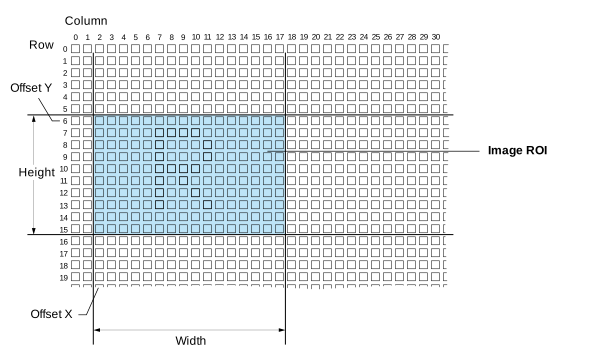
Image ROI의 크기(특히 높이)를 줄이면 카메라의 최대 프레임 레이트가 크게 증가합니다.
지침#
Image ROI를 지정할 때는 다음 지침을 따르십시오:
| 지침 | 예시 |
|---|---|
OffsetX + Width ≤ WidthMax | 1920 x 1080 픽셀 센서를 탑재한 카메라:OffsetX + Width ≤ 1920 |
OffsetY + Height ≤ HeightMax | 1920 x 1080 픽셀 센서를 탑재한 카메라:OffsetY + Height ≤ 1080 |
세부 정보#
Image ROI 크기#
| Camera Model | Minimum Width | 너비 증가분 | Minimum Height | 높이 증가분 |
|---|---|---|---|---|
| daA2500-60mc | 2 | 2 | 2 | 2 |
| daA2500-60mci | 96 | 8 | 64 | 8 |
| daA3840-30mc | 2 | 2 | 2 | 2 |
| daA4200-30mci | 96 | 8 | 64 | 8 |
Image ROI 오프셋#
| Camera Model | Offset X 증가분 | Offset Y 증가분 |
|---|---|---|
| daA2500-60mc | 2 | 2 |
| daA2500-60mci | 8 | 8 |
| daA3840-30mc | 2 | 2 |
| daA4200-30mci | 8 | 8 |
샘플 코드#
INodeMap& nodemap = camera.GetNodeMap();
// Set the width to the maximum value
int64_t maxWidth = CIntegerParameter(nodemap, "WidthMax").GetValue();
CIntegerParameter(nodemap, "Width").SetValue(maxWidth);
// Set the height to 500
CIntegerParameter(nodemap, "Height").SetValue(500);
// Set the offset to 0
CIntegerParameter(nodemap, "OffsetX").SetValue(0);
CIntegerParameter(nodemap, "OffsetY").SetValue(0);
// Set the width to the maximum value
Int64 maxWidth = camera.Parameters[PLCamera.WidthMax].GetValue();
camera.Parameters[PLCamera.Width].SetValue(maxWidth);
// Set the height to 500
camera.Parameters[PLCamera.Height].SetValue(500);
// Set the offset to 0
camera.Parameters[PLCamera.OffsetX].SetValue(0);
camera.Parameters[PLCamera.OffsetY].SetValue(0);
/* Macro to check for errors */
#define CHECK(errc) if (GENAPI_E_OK != errc) printErrorAndExit(errc)
GENAPIC_RESULT errRes = GENAPI_E_OK;  /* Return value of pylon methods */
int64_t maxWidth = 0;
/* Set the width to the maximum value */
errRes = PylonDeviceGetIntegerFeature(hdev, "WidthMax", &maxWidth);
CHECK(errRes);
errRes = PylonDeviceSetIntegerFeature(hdev, "Width", maxWidth);
CHECK(errRes);
/* Set the height to 500 */
errRes = PylonDeviceSetIntegerFeature(hdev, "Height", 500);
CHECK(errRes);
/* Set the offset to 0 */
errRes = PylonDeviceSetIntegerFeature(hdev, "OffsetX", 0);
CHECK(errRes);
errRes = PylonDeviceSetIntegerFeature(hdev, "OffsetY", 0);
CHECK(errRes);
/* Macro to check for errors */
#define CHECK(errc) if (GENAPI_E_OK != errc) printErrorAndExit(errc)
GENAPIC_RESULT errRes = GENAPI_E_OK;  /* Return value of pylon methods */
int64_t maxWidth = 0;
/* Set the width to the maximum value */
errRes = PylonDeviceGetIntegerFeature(hdev, "WidthMax", &maxWidth);
CHECK(errRes);
errRes = PylonDeviceSetIntegerFeature(hdev, "Width", maxWidth);
CHECK(errRes);
/* Set the height to 500 */
errRes = PylonDeviceSetIntegerFeature(hdev, "Height", 500);
CHECK(errRes);
/* Set the offset to 0 */
errRes = PylonDeviceSetIntegerFeature(hdev, "OffsetX", 0);
CHECK(errRes);
errRes = PylonDeviceSetIntegerFeature(hdev, "OffsetY", 0);
CHECK(errRes);
pylon Viewer를 사용하여 매개변수를 간편하게 설정할 수도 있습니다.