콘텐츠로 건너뛰기
STAGING SERVER
DEVELOPMENT SERVER

Gamma (dart E)#

Gamma camera feature를 사용하면 모니터 디스플레이에 맞게 획득된 이미지의 밝기를 최적화할 수 있습니다.

기능 사용법#

작동 원리#

카메라는 다음 공식에 따라 각 픽셀의 밝기 값에 Gamma correction 값(γ)을 적용합니다(컬러 카메라의 적색 픽셀 값(R)을 예로 듦):
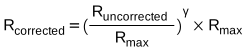
Gamma Correction 공식(적색 픽셀)

최대 픽셀 값(Rmax)은 예를 들어 8-bit pixel formats의 경우 255이고 10-bit pixel format의 경우 1 023입니다.

Gamma Correction 구성하기#

Gamma correction을 구성하려면 Gamma parameter를 원하는 값으로 설정하세요. parameter의 값 범위는 0부터 ≈4까지입니다. - Gamma = 1: 전체 밝기가 변경되지 않고유지됩니다. - Gamma < 1: 전체 밝기가 증가합니다유지됩니다. - Gamma > 1: 전체 밝기가 감소합니다.

모든 경우에 검은색 픽셀(밝기 = 0)과 흰색 픽셀(밝기 = 최대값)은 조정되지 않습니다.

정보

Gamma correction을 활성화하고 pixel format이 12-bit pixel format으로 설정된 경우, 일부 이미지 정보가 손실됩니다. 픽셀 데이터 출력은 여전히 12-bit이지만, 픽셀 값은 gamma correction 프로세스 중에 보간됩니다.

색공간 설정하기#

daA…mci 카메라 모듈에서는 BslColorSpace parameter를 사용할 수 있습니다. 이를 통해 다음 gamma correction 모드 중 하나를 선택할 수 있습니다.

  • RGB: 추가적인 gamma correction 값이 적용되지 않습니다.
  • sRGB: 이미지 밝기가 sRGB 모니터 디스플레이에 맞게 최적화됩니다. 약 0.4의 gamma correction 값이 적용되고, Gamma parameter는 읽기 전용이 되며, Gamma parameter 값은 무시됩니다.

샘플 코드#

// Set the Gamma value to 1.2
camera.Gamma.SetValue(1.2);
INodeMap& nodemap = camera.GetNodeMap();
// Set the Gamma value to 1.2
CFloatParameter(nodemap, "Gamma").SetValue(1.2);
// Set the Gamma value to 1.2
camera.Parameters[PLCamera.Gamma].SetValue(1.2);
/* Macro to check for errors */
#define CHECK(errc) if (GENAPI_E_OK != errc) printErrorAndExit(errc)
GENAPIC_RESULT errRes = GENAPI_E_OK;  /* Return value of pylon methods */
/* Set the Gamma value to 1.2 */
errRes = PylonDeviceSetFloatFeature(hdev, "Gamma", 1.2);
CHECK(errRes);
# Set the Gamma value to 1.2
camera.Gamma.Value = 1.2
/* Macro to check for errors */
#define CHECK(errc) if (GENAPI_E_OK != errc) printErrorAndExit(errc)
GENAPIC_RESULT errRes = GENAPI_E_OK;  /* Return value of pylon methods */
/* Set the Gamma value to 1.2 */
errRes = PylonDeviceSetFloatFeature(hdev, "Gamma", 1.2);
CHECK(errRes);

You can also use the pylon Viewer to easily set the parameters.