Color Transformation#
이 기능은 색상 변환 행렬을 사용하여 이미지 취득 중에 사용된 광원으로 인해 발생한 색상 편차를 보정하고 센서의 색상 생성 과정에서 발생하는 결함을 보완할 수 있습니다.
정보
행렬 색상 변환에 대해 잘 알고 있는 경우에만 이 기능을 사용하는 것이 좋습니다. 시행착오를 통해 변환 행렬에 올바른 값을 입력하는 것은 거의 불가능합니다.
기능 사용#
Color Transformation 구성하기#
- white balance가 올바르게 구성되어 있는지 확인하십시오.
- 파라미터를 원하는
ProcessedRawEnable파라메터true(사용 가능한 경우 그리고 Bayer를 사용하는 경우 픽셀 형식). - 파라미터를 원하는
LightSourcePreset파라메터Custom(사용 가능한 경우). - 파라미터를 원하는
ColorTransformationValueSelector매개변수를 원하는 행렬에서의 위치, 예를 들어,Gain00. - 다음에 대한 원하는 값을 입력하십시오.
ColorTransformationValue선택한 위치의 값을 조정하는 파라미터입니다. 파라미터의 값 범위는 -8.0에서 +7.96875 사이입니다.
정보
변환 행렬에는 이미 색상 변환 값이 채워져 있습니다. 이 값들은 이전에 선택한 Light Source Preset과 관련이 있거나, 단위 벡터에 해당하거나, 이전 색상 변환 기능 사용 결과에서 비롯된 것입니다.
ColorTransformationMatrixFactor 파라미터
GigE 인터페이스가 장착된 ace Classic/U/L 카메라에서만 사용할 수 있는 이 파라미터는 색상 행렬이 색상 값에 미치는 영향의 정도를 결정합니다. 0으로 설정하면 행렬이 사실상 비활성화됩니다. Basler는 기본 설정인 1로 유지할 것을 권장합니다.
작동 방식#
색상 변환 기능은 변환 행렬을 사용하여 각 픽셀에 대해 수정된 빨간색, 초록색, 파란색 픽셀 데이터를 제공합니다.
변환은 R, G, B 픽셀 값이 포함된 3 x 1 행렬에 색상 변환 값이 포함된 3 x 3 행렬을 전위 곱(premultiplying)하여 수행됩니다.
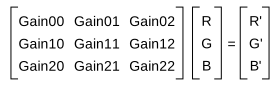
요구 사항에 따라 각 행렬 값(Gain00, Gain01 등)을 설정할 수 있습니다.
외부 링크#
샘플 코드#
// Select position Gain00 in the matrix
camera.ColorTransformationValueSelector.SetValue(ColorTransformationValueSelector_Gain00);
// Enter a floating point value for the selected position
camera.ColorTransformationValue.SetValue(1.5625);
// Select position Gain01 in the matrix
camera.ColorTransformationValueSelector.SetValue(ColorTransformationValueSelector_Gain01);
// Enter a floating point value for the selected position
camera.ColorTransformationValue.SetValue(-0.4375);
INodeMap& nodemap = camera.GetNodeMap();
// Select position Gain00 in the matrix
CEnumParameter(nodemap, "ColorTransformationValueSelector").SetValue("Gain00");
// Enter a floating point value for the selected position
CFloatParameter(nodemap, "ColorTransformationValue").SetValue(1.5625);
// Select position Gain01 in the matrix
CEnumParameter(nodemap, "ColorTransformationValueSelector").SetValue("Gain01");
// Enter a floating point value for the selected position
CFloatParameter(nodemap, "ColorTransformationValue").SetValue(-0.4375);
// Select position Gain00 in the matrix
camera.Parameters[PLCamera.ColorTransformationValueSelector].SetValue(PLCamera.ColorTransformationValueSelector.Gain00);
// Enter a floating point value for the selected position
camera.Parameters[PLCamera.ColorTransformationValue].SetValue(1.5625);
// Select position Gain01 in the matrix
camera.Parameters[PLCamera.ColorTransformationValueSelector].SetValue(PLCamera.ColorTransformationValueSelector.Gain01);
// Enter a floating point value for the selected position
camera.Parameters[PLCamera.ColorTransformationValue].SetValue(-0.4375);
/* Macro to check for errors */
#define CHECK(errc) if (GENAPI_E_OK != errc) printErrorAndExit(errc)
GENAPIC_RESULT errRes = GENAPI_E_OK;  /* Return value of pylon methods */
/* Select position Gain00 in the matrix */
errRes = PylonDeviceFeatureFromString(hdev, "ColorTransformationValueSelector", "Gain00");
CHECK(errRes);
/* Enter a floating point value for the selected position */
errRes = PylonDeviceSetFloatFeature(hdev, "ColorTransformationValue", 1.5625);
CHECK(errRes);
/* Select position Gain01 in the matrix */
errRes = PylonDeviceFeatureFromString(hdev, "ColorTransformationValueSelector", "Gain01");
CHECK(errRes);
/* Enter a floating point value for the selected position */
errRes = PylonDeviceSetFloatFeature(hdev, "ColorTransformationValue", -0.4375);
CHECK(errRes);
# Select position Gain00 in the matrix
camera.ColorTransformationValueSelector.Value = "Gain00"
# Enter a floating point value for the selected position
camera.ColorTransformationValue.Value = 1.5625
# Select position Gain01 in the matrix
camera.ColorTransformationValueSelector.Value = "Gain01"
# Enter a floating point value for the selected position
camera.ColorTransformationValue.Value = -0.4375
pylon Viewer를 사용하여 파라미터를 손쉽게 설정할 수도 있습니다.