Stacked Zone Imaging#
해당 영역의 픽셀 데이터만 전송됩니다. 이를 통해 카메라의 프레임 레이트가 향상됩니다.
기능 사용#
작동 방식#
Stacked Zone Imaging 기능을 사용하면 센서 어레이에서 너비가 같고 수직으로 정렬된 영역을 최대 8개까지 정의할 수 있습니다. 이미지를 획득하면 정의된 영역 내의 픽셀 정보만 센서에서 읽어옵니다. 그런 다음 픽셀 정보가 적층되어 단일 이미지로 전송됩니다.
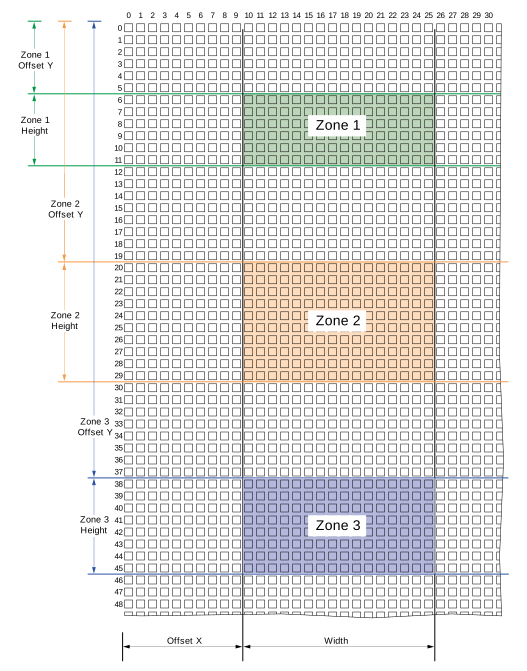
영역은 항상 너비가 동일하며 수직으로 정렬됩니다. ROI 영역을 구성하려면 Basler에서는 다음 절차를 권장합니다.
- 모든 영역에 유효한 너비와 수평 오프셋을 정의합니다.
- 개별 영역의 높이와 수직 오프셋을 정의합니다.
Stacked Zone Imaging 구성#
- 사용 가능한 경우 Center X and Center Y 및 Decimation 기능을 비활성화합니다.
- 파라미터를 원하는
StackedZoneImagingEnable파라메터true.
Stacked Zone Imaging 기능이 활성화되었으며 구성할 수 있습니다. - 파라미터를 원하는
OffsetX파라미터를 원하는 수평 오프셋으로 설정합니다. 이 값은 다음 항목에 적용됩니다. 모든 영역. - 파라미터를 원하는
Width파라미터를 원하는 영역 너비로 설정합니다. 이 값은 다음 항목에 적용됩니다. 모든 영역. - 파라미터를 원하는
StackedZoneImagingIndex구성하려는 영역에 대한 파라미터(예: 1)입니다. - 파라미터를 원하는
StackedZoneImagingZoneEnable파라메터true4단계에서 선택한 영역을 활성화합니다. - 파라미터를 원하는
StackedZoneImagingZoneOffsetY파라미터를 원하는 수직 오프셋으로 설정합니다. 이 값은 4단계에서 선택한 영역에 적용됩니다. - 파라미터를 원하는
StackedZoneImagingZoneHeight원하는 영역 높이로 설정되는 파라미터입니다.
값이 4단계에서 선택한 영역에 적용됩니다. - 구성하려는 모든 영역에 대해 4~7단계를 반복합니다.
Stacked Zone Imaging 사용 시 고려 사항#
- 원하는 순서대로 영역을 활성화할 수 있습니다. 예를 들어 영역 2, 4, 6을 활성화하고 영역 1, 3, 5를 비활성화할 수 있습니다.
- 센서 주변에 영역을 자유롭게 배치할 수 있습니다. 예를 들어 영역 1을 하단 근처에, 영역 3을 상단 근처에, 영역 2를 중앙에 배치할 수 있습니다. 그러나 카메라는 항상 센서의 가장 상단 영역에서 픽셀 데이터 읽기 및 전송을 시작한 다음 하단쪽으로 진행합니다.
- 수직으로 겹치는 영역을 정의할 수 있습니다. 두 영역이 겹치면 하나의 병합된 영역으로 전송됩니다. 겹치는 영역의 픽셀 데이터는 한 번만 읽혀서 전송됩니다.
- 다음을 설정할 수 있습니다.
StackedZoneImagingZoneOffsetY및StackedZoneImagingZoneHeight모노 카메라는 1씩, 컬러 카메라는 2씩 증가하는 파라미터입니다. 컬러 카메 경우 파라미터 값은 짝수여야 합니다. - Stacked Zone Imaging 기능이 활성화되면 다음 파라미터가 읽기 전용으로 전환됩니다.
OffsetY
파라미터가 가장 상단 영역의 수직 오프셋으로 설정됩니다.Height
파라미터가 최종 이미지의 높이, 즉 모든 영역 높이의 합으로 설정됩니다.CenterY
- Stacked Zone Imaging 기능을 활성화한 후 Binning을 활성화하면 적층된 영역의 위치와 크기가 자동으로 조정됩니다. 파라미터 값은 해당 binning 팩터로 나누어진 후 내림됩니다.
- Stacked Zone Imaging 기능을 사용한 후 모든 영역을 비활성화하면 Image ROI의 크기와 위치가 마지막으로 비활성화된 영역의 크기와 위치로 설정됩니다. 예를 들어 영역 0, 1, 2가 활성화되어 있다고 가정해 보겠습니다. 그런 다음 2, 1, 0 순서로 영역을 비활성화합니다. 결과적으로 image ROI의 크기와 위치는 비활성화된 영역 0의 크기와 위치로 설정됩니다.
샘플 코드#
// Enable stacked zone imaging
camera.StackedZoneImagingEnable.SetValue(true);
// Configure width and offset X for all zones
camera.Width.SetValue(200);
camera.OffsetX.SetValue(100);
// Select zone 1
camera.StackedZoneImagingIndex.SetValue(1);
// Enable the selected zone
camera.StackedZoneImagingZoneEnable.SetValue(true);
// Set the vertical offset for the selected zone
camera.StackedZoneImagingZoneOffsetY.SetValue(100);
// Set the height for the selected zone
camera.StackedZoneImagingZoneHeight.SetValue(100);
// Select zone 2
camera.StackedZoneImagingIndex.SetValue(2);
// Enable the selected zone
camera.StackedZoneImagingZoneEnable.SetValue(true);
// Set the offset Y for the selected zone
camera.StackedZoneImagingZoneOffsetY.SetValue(250);
// Set the height for the selected zone
camera.StackedZoneImagingZoneHeight.SetValue(200);
INodeMap& nodemap = camera.GetNodeMap();
// Enable stacked zone imaging
CBooleanParameter(nodemap, "StackedZoneImagingEnable").SetValue(true);
// Configure width and offset X for all zones
CIntegerParameter(nodemap, "Width").SetValue(200);
CIntegerParameter(nodemap, "OffsetX").SetValue(100);
// Select zone 1
CIntegerParameter(nodemap, "StackedZoneImagingIndex").SetValue(1);
// Enable the selected zone
CBooleanParameter(nodemap, "StackedZoneImagingZoneEnable").SetValue(true);
// Set the vertical offset for the selected zone
CIntegerParameter(nodemap, "StackedZoneImagingZoneOffsetY").SetValue(100);
// Set the height for the selected zone
CIntegerParameter(nodemap, "StackedZoneImagingZoneHeight").SetValue(100);
// Select zone 2
CIntegerParameter(nodemap, "StackedZoneImagingIndex").SetValue(2);
// Enable the selected zone
CBooleanParameter(nodemap, "StackedZoneImagingZoneEnable").SetValue(true);
// Set the offset Y for the selected zone
CIntegerParameter(nodemap, "StackedZoneImagingZoneOffsetY").SetValue(250);
// Set the height for the selected zone
CIntegerParameter(nodemap, "StackedZoneImagingZoneHeight").SetValue(200);
// Enable stacked zone imaging
camera.Parameters[PLCamera.StackedZoneImagingEnable].SetValue(true);
// Configure width and offset X for all zones
camera.Parameters[PLCamera.Width].SetValue(200);
camera.Parameters[PLCamera.OffsetX].SetValue(100);
// Select zone 1
camera.Parameters[PLCamera.StackedZoneImagingIndex].SetValue(1);
// Enable the selected zone
camera.Parameters[PLCamera.StackedZoneImagingZoneEnable].SetValue(true);
// Set the vertical offset for the selected zone
camera.Parameters[PLCamera.StackedZoneImagingZoneOffsetY].SetValue(100);
// Set the height for the selected zone
camera.Parameters[PLCamera.StackedZoneImagingZoneHeight].SetValue(100);
// Select zone 2
camera.Parameters[PLCamera.StackedZoneImagingIndex].SetValue(2);
// Enable the selected zone
camera.Parameters[PLCamera.StackedZoneImagingZoneEnable].SetValue(true);
// Set the offset Y for the selected zone
camera.Parameters[PLCamera.StackedZoneImagingZoneOffsetY].SetValue(250);
// Set the height for the selected zone
camera.Parameters[PLCamera.StackedZoneImagingZoneHeight].SetValue(200);
/* Macro to check for errors */
#define CHECK(errc) if (GENAPI_E_OK != errc) printErrorAndExit(errc)
GENAPIC_RESULT errRes = GENAPI_E_OK;  /* Return value of pylon methods */
/* Enable stacked zone imaging */
errRes = PylonDeviceSetBooleanFeature(hdev, "StackedZoneImagingEnable", 1);
CHECK(errRes);
/* Configure width and offset X for all zones */
errRes = PylonDeviceSetIntegerFeature(hdev, "Width", 200);
CHECK(errRes);
errRes = PylonDeviceSetIntegerFeature(hdev, "OffsetX", 100);
CHECK(errRes);
/* Select zone 1 */
errRes = PylonDeviceSetIntegerFeature(hdev, "StackedZoneImagingIndex", 1);
CHECK(errRes);
/* Enable the selected zone */
errRes = PylonDeviceSetBooleanFeature(hdev, "StackedZoneImagingZoneEnable", 1);
CHECK(errRes);
/* Set the vertical offset for the selected zone */
errRes = PylonDeviceSetIntegerFeature(hdev, "StackedZoneImagingZoneOffsetY", 100);
CHECK(errRes);
/* Set the height for the selected zone */
errRes = PylonDeviceSetIntegerFeature(hdev, "StackedZoneImagingZoneHeight", 100);
CHECK(errRes);
/* Select zone 2 */
errRes = PylonDeviceSetIntegerFeature(hdev, "StackedZoneImagingIndex", 2);
CHECK(errRes);
/* Enable the selected zone */
errRes = PylonDeviceSetBooleanFeature(hdev, "StackedZoneImagingZoneEnable", 1);
CHECK(errRes);
/* Set the offset Y for the selected zone */
errRes = PylonDeviceSetIntegerFeature(hdev, "StackedZoneImagingZoneOffsetY", 250);
CHECK(errRes);
/* Set the height for the selected zone */
errRes = PylonDeviceSetIntegerFeature(hdev, "StackedZoneImagingZoneHeight", 200);
CHECK(errRes);
# Enable stacked zone imaging
camera.StackedZoneImagingEnable.Value = True
# Configure width and offset X for all zones
camera.Width.Value = 200
camera.OffsetX.Value = 100
# Select zone 1
camera.StackedZoneImagingIndex.Value = 1
# Enable the selected zone
camera.StackedZoneImagingZoneEnable.Value = True
# Set the vertical offset for the selected zone
camera.StackedZoneImagingZoneOffsetY.Value = 100
# Set the height for the selected zone
camera.StackedZoneImagingZoneHeight.Value = 100
# Select zone 2
camera.StackedZoneImagingIndex.Value = 2
# Enable the selected zone
camera.StackedZoneImagingZoneEnable.Value = True
# Set the offset Y for the selected zone
camera.StackedZoneImagingZoneOffsetY.Value = 250
# Set the height for the selected zone
camera.StackedZoneImagingZoneHeight.Value = 200
pylon Viewer를 사용하여 파라미터를 손쉽게 설정할 수도 있습니다.