Dual ROI#
해당 영역의 픽셀 데이터만 전송됩니다. 이를 통해 카메라의 프레임 레이트가 향상됩니다.
이 기능은 Basler boost V 카메라 모델에서만 사용할 수 있습니다.
기능 사용#
작동 방식#
Dual ROI 기능을 사용하면 수직 방향으로 센서 어레이의 두 영역을 정의할 수 있습니다.
이미지를 획득할 때 영역 내부의 픽셀 정보만 센서에서 읽어와 단일 이미지로 전송됩니다.
- height 및 vertical offset은 두 영역에 대해 각각 개별적으로 정의할 수 있습니다. 센서 어레이에서 rows를 구성하여 수행합니다.
- The width 및 horizontal offset 은(는) 두 영역에서 항상 동일합니다. 이 값들은 글로벌
OffsetX및Width매개변수.
아래 예시에서는 두 개의 행이 정의되었습니다. 이로 인해 두 개의 영역이 생성됩니다.
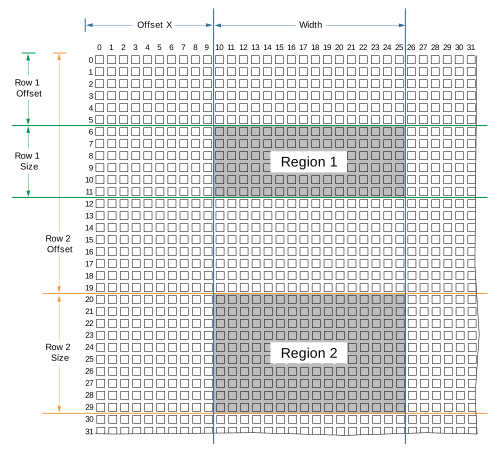
Region 1 및 Region 2 내의 픽셀 정보가 단일 이미지로 전송됩니다.
영역 구성하기#
영역을 구성하려면:
- 카메라가 유휴 상태인지, 즉 이미지를 캡처하고 있지 않은지 확인하십시오.
- 파라미터를 원하는
BslDualROIRowsEnable파라메터true. - 파라미터를 원하는
BslDualROIRowSelector파라메터Row1. - 파라미터를 원하는
BslDualROIRowOffset파라미터를 원하는 행의 수직 오프셋(예: 100)으로 설정합니다. - 파라미터를 원하는
BslDualROIRowSize파라미터를 원하는 행의 높이(예: 50)로 설정합니다. - 다음의 값이 올바른지 확인하십시오.
BslDualROIImageValid매개변수가true. 그렇지 않은 경우 파라미터 설정을 변경하십시오.
예를 들어, 영역이 서로 겹치지 않아야 하며 모든 영역의 총 높이가 이미지 센서의 높이를 초과해서는 안 됩니다. - 행 2에 대해 위의 단계를 반복합니다.
- 파라미터를 원하는
OffsetX파라미터를 두 영역의 원하는 horizontal offset(으)로 설정합니다. - 파라미터를 원하는
Width파라미터를 두 영역의 원하는 width(으)로 설정합니다.
Dual ROI 기능을 사용할 때의 고려사항#
-
카메라 모델에서
BslDualROIRowsEnable파라미터가 다음으로 설정된 경우에만 Light Control 기능과 함께 사용할 수 있음을 명시했습니다.true, image acquisition이 시작될 때마다 다음 파라미터가 자동으로 설정됩니다.OffsetY: 파라미터가 행 1의 수직 오프셋으로 설정됩니다.Height: 이 파라미터는 모든 영역의 총 높이, 즉 Dual ROI 기능에 의해 생성된 이미지의 높이로 설정됩니다.
Dual ROI 기능을 사용하는 동안 이러한 파라미터를 변경할 수는 있지만 적용되지는 않습니다.
-
auto function ROI의 위치와 크기는 Dual ROI 기능의 출력에 맞춰 자동으로 조정되지 않습니다. 자동 기능을 사용하는 경우 Dual ROI 영역이 auto function ROI 내에 포함되도록 하십시오.
샘플 코드#
// ** In this example, we define two regions in vertical direction
// that will be transmitted as a single image. **
// Enable the Dual ROI feature
camera.BslDualROIRowsEnable.SetValue(true);
// Select row 1
camera.BslDualROIRowSelector.SetValue(BslDualROIRowSelector_Row1);
// The first region should have a vertical offset of 100 and a height of 300 pixels
camera.BslDualROIRowOffset.SetValue(100);
camera.BslDualROIRowSize.SetValue(300);
// Select row 2
camera.BslDualROIRowSelector.SetValue(BslDualROIRowSelector_Row1);
// The second region should have a vertical offset of 500 and a height of 400 pixels
camera.BslDualROIRowOffset.SetValue(500);
camera.BslDualROIRowSize.SetValue(400);
// Check whether the outgoing image is valid
bool heightValid = camera.BslDualROIImageValid.GetValue();
// Both regions should have a horizontal offset of 200 and a width of 500
camera.OffsetX.SetValue(200);
camera.Width.SetValue(500);
INodeMap& nodemap = camera.GetNodeMap();
// ** In this example, we define two regions in vertical direction
// that will be transmitted as a single image. **
// Enable the Dual ROI feature
CBooleanParameter(nodemap, "BslDualROIRowsEnable").SetValue(true);
// Select row 1
CEnumParameter(nodemap, "BslDualROIRowSelector").SetValue("Row1");
// The first region should have a vertical offset of 100 and a height of 300 pixels
CIntegerParameter(nodemap, "BslDualROIRowOffset").SetValue(100);
CIntegerParameter(nodemap, "BslDualROIRowSize").SetValue(300);
// Select row 2
CEnumParameter(nodemap, "BslDualROIRowSelector").SetValue("Row1");
// The second region should have a vertical offset of 500 and a height of 400 pixels
CIntegerParameter(nodemap, "BslDualROIRowOffset").SetValue(500);
CIntegerParameter(nodemap, "BslDualROIRowSize").SetValue(400);
// Check whether the outgoing image is valid
bool heightValid = CBooleanParameter(nodemap, "BslDualROIImageValid").GetValue();
// Both regions should have a horizontal offset of 200 and a width of 500
CIntegerParameter(nodemap, "OffsetX").SetValue(200);
CIntegerParameter(nodemap, "Width").SetValue(500);
// ** In this example, we define two regions in vertical direction
// that will be transmitted as a single image. **
// Enable the Dual ROI feature
camera.Parameters[PLCamera.BslDualROIRowsEnable].SetValue(true);
// Select row 1
camera.Parameters[PLCamera.BslDualROIRowSelector].SetValue(PLCamera.BslDualROIRowSelector.Row1);
// The first region should have a vertical offset of 100 and a height of 300 pixels
camera.Parameters[PLCamera.BslDualROIRowOffset].SetValue(100);
camera.Parameters[PLCamera.BslDualROIRowSize].SetValue(300);
// Select row 2
camera.Parameters[PLCamera.BslDualROIRowSelector].SetValue(PLCamera.BslDualROIRowSelector.Row1);
// The second region should have a vertical offset of 500 and a height of 400 pixels
camera.Parameters[PLCamera.BslDualROIRowOffset].SetValue(500);
camera.Parameters[PLCamera.BslDualROIRowSize].SetValue(400);
// Check whether the outgoing image is valid
bool heightValid = camera.Parameters[PLCamera.BslDualROIImageValid].GetValue();
// Both regions should have a horizontal offset of 200 and a width of 500
camera.Parameters[PLCamera.OffsetX].SetValue(200);
camera.Parameters[PLCamera.Width].SetValue(500);
/* Macro to check for errors */
#define CHECK(errc) if (GENAPI_E_OK != errc) printErrorAndExit(errc)
GENAPIC_RESULT errRes = GENAPI_E_OK;  /* Return value of pylon methods */
_Bool heightValid = false;
/* ** In this example, we define two regions in vertical direction */
/* that will be transmitted as a single image. ** */
/* Enable the Dual ROI feature */
errRes = PylonDeviceSetBooleanFeature(hdev, "BslDualROIRowsEnable", 1);
CHECK(errRes);
/* Select row 1 */
errRes = PylonDeviceFeatureFromString(hdev, "BslDualROIRowSelector", "Row1");
CHECK(errRes);
/* The first region should have a vertical offset of 100 and a height of 300 pixels */
errRes = PylonDeviceSetIntegerFeature(hdev, "BslDualROIRowOffset", 100);
CHECK(errRes);
errRes = PylonDeviceSetIntegerFeature(hdev, "BslDualROIRowSize", 300);
CHECK(errRes);
/* Select row 2 */
errRes = PylonDeviceFeatureFromString(hdev, "BslDualROIRowSelector", "Row1");
CHECK(errRes);
/* The second region should have a vertical offset of 500 and a height of 400 pixels */
errRes = PylonDeviceSetIntegerFeature(hdev, "BslDualROIRowOffset", 500);
CHECK(errRes);
errRes = PylonDeviceSetIntegerFeature(hdev, "BslDualROIRowSize", 400);
CHECK(errRes);
/* Check whether the outgoing image is valid */
errRes = PylonDeviceGetBooleanFeature(hdev, "BslDualROIImageValid", &heightValid);
CHECK(errRes);
/* Both regions should have a horizontal offset of 200 and a width of 500 */
errRes = PylonDeviceSetIntegerFeature(hdev, "OffsetX", 200);
CHECK(errRes);
errRes = PylonDeviceSetIntegerFeature(hdev, "Width", 500);
CHECK(errRes);
# ** In this example, we define two regions in vertical direction
# that will be transmitted as a single image. **
# Enable the Dual ROI feature
camera.BslDualROIRowsEnable.Value = True
# Select row 1
camera.BslDualROIRowSelector.Value = "Row1"
# The first region should have a vertical offset of 100 and a height of 300 pixels
camera.BslDualROIRowOffset.Value = 100
camera.BslDualROIRowSize.Value = 300
# Select row 2
camera.BslDualROIRowSelector.Value = "Row1"
# The second region should have a vertical offset of 500 and a height of 400 pixels
camera.BslDualROIRowOffset.Value = 500
camera.BslDualROIRowSize.Value = 400
# Check whether the outgoing image is valid
heightValid = camera.BslDualROIImageValid.Value
# Both regions should have a horizontal offset of 200 and a width of 500
camera.OffsetX.Value = 200
camera.Width.Value = 500
pylon Viewer를 사용하여 파라미터를 손쉽게 설정할 수도 있습니다.